
There are a few things that I’d like you to notice:
Multitable inserts allow a
single INSERT INTO .. SELECT statement to
conditionally, or non-conditionally, insert into multiple tables.
This statement reduces table scans and PL/SQL code necessary for
performing multiple conditional inserts compared to previous
versions. It's main use is for the ETL process in data warehouses
where it can be parallelized and/or convert non-relational data
into a relational format.
There are actually two types of multi-table insert statements: conditional and unconditional. Let’s look at the latter first, we’ll return to conditional multi-insert statements a little later.
There are a few things that I’d like you to notice:
The above statement will take the relevant columns from source_table and insert them into table1, table2 andtable3. Without multi-table inserts, this would have taken three separate insert statements.
And that’s that for unconditional multi-table inserts; nice and straightforward.
Oh, by the way, if you’re finding that requirement for a source subquery a little restrictive, here’s a nice little trick for you: select from dual.
Conditional multi-table inserts are cleverer than their unconditional cousins and, at first glance, look a lot more complicated. Trust me, they aren’t. Just imagine an Insert statement and a Case statement got drunk together and, nine months later, had a baby; it’d probably look a lot like a conditional multi-table insert. Here’s the syntax:
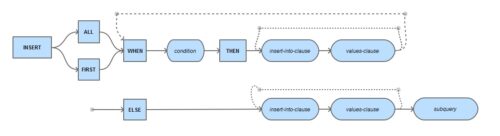
Let’s dive straight in with an example. Imagine we created 3 new tables – Top_earners, mid_earners and low_earners – and we wanted to populate them from the standard EMP table, based on which tax bracket each member of staff falls into.
Taking another look at our statement, I realise that we can tweak it a little, using the ELSE clause.
The final piece of the jigsaw puzzle that we need to talk about is the FIRST keyword that can be used in conjunction with conditional multi-table insert statements (but not with unconditional multi-table inserts).
If you begin your statement with INSERT FIRST instead of INSERT ALL, Oracle will analyse each WHEN condition (in order, from the top) and once it has found a condition that resolves to TRUE it will carry out that insert and not analyse any of the subsequent WHEN conditions. It will do this for each row returned by the source subquery.
Is that clear? No? I didn’t think so. Let me see if I can make it a little clearer by rewriting our EMP example using INSERT FIRST. Remember that we want to segregate our employees based on how much money they earn.
The above statement would have made no sense with an INSERT ALL. King, whose salary is 5000, would have ended up being inserted into all three tables (since 5000 is greater than 3000, and 5000 is greater than 1500, and 5000 is greater than nothing). However, with INSERT FIRST, Oracle executes the insert statement associated with the first condition that is true, and ignores all subsequent ones. So when we get to Blake, who earns 2850, the top condition will resolve to false and be ignored, the second condition will resolve to true and so his details will be inserted into the mid_earners table; and even though the last condition would have resolved to true too, the database does not even glance at it.
I did say that there were a few restrictions that you’d have to bear in mind, didn’t I? Fortunately, they’re nothing major. However:
The MERGE statement was
introduced in Oracle 9i to conditionally insert or update data
depending on its presence, a process also known as an "upsert".
The MERGE statement reduces
table scans and can perform the operation in parallel if required.
Consider the following
example where data from the HR_RECORDS table is merged into
the EMPLOYEES table.
MERGE INTO employees e
    USING hr_records h
    ON (e.id = h.emp_id)
  WHEN MATCHED THEN
    UPDATE SET e.address = h.address
  WHEN NOT MATCHED THEN
    INSERT (id, address)
    VALUES (h.emp_id, h.address);
The source can also be a query.
MERGE INTO employees e
    USING (SELECT * FROM hr_records WHERE start_date > ADD_MONTHS(SYSDATE, -1)) h
    ON (e.id = h.emp_id)
  WHEN MATCHED THEN
    UPDATE SET e.address = h.address
  WHEN NOT MATCHED THEN
    INSERT (id, address)
    VALUES (h.emp_id, h.address);
The MERGE statement is
optimized for merging sets of data, rather than single rows, as
shown in the example below.
Create the following test
tables. The source table contains all the rows from the ALL_OBJECTS view, while the
destination table contains approximately half of the rows.
CREATE TABLE source_tab AS
SELECT object_id, owner, object_name, object_type
FROM   all_objects;

ALTER TABLE source_tab ADD (
  CONSTRAINT source_tab_pk PRIMARY KEY (object_id)
);

CREATE TABLE dest_tab AS
SELECT object_id, owner, object_name, object_type
FROM   all_objects WHERE ROWNUM <= 25000;

ALTER TABLE dest_tab ADD (
  CONSTRAINT dest_tab_pk PRIMARY KEY (object_id)
);

EXEC DBMS_STATS.gather_table_stats(USER, 'source_tab', cascade=> TRUE);
EXEC DBMS_STATS.gather_table_stats(USER, 'dest_tab', cascade=> TRUE);
The following code compares
the performance of four merge operations. The first uses the
straight MERGE statement. The second
also uses the MERGE statement, but in a
row-by-row manner. The third performs an update, and conditionally
inserts the row if the update touches zero rows. The fourth
inserts the row, then performs an update if the insert fails with
a duplicate value on index exception.
SET SERVEROUTPUT ON
DECLARE
  TYPE t_tab IS TABLE OF source_tab%ROWTYPE;

  l_tab   t_tab;
  l_start NUMBER;
BEGIN

  l_start := DBMS_UTILITY.get_time;

  MERGE INTO dest_tab a
    USING source_tab b
    ON (a.object_id = b.object_id)
    WHEN MATCHED THEN
      UPDATE SET
        owner       = b.owner,
        object_name = b.object_name,
        object_type = b.object_type
    WHEN NOT MATCHED THEN
      INSERT (object_id, owner, object_name, object_type)
      VALUES (b.object_id, b.owner, b.object_name, b.object_type);

  DBMS_OUTPUT.put_line('MERGE        : ' ||
                       (DBMS_UTILITY.get_time - l_start) || ' hsecs');

  ROLLBACK;

  l_start := DBMS_UTILITY.get_time;

  SELECT *
  BULK COLLECT INTO l_tab
  FROM source_tab;

  FOR i IN l_tab.first .. l_tab.last LOOP
    MERGE INTO dest_tab a
      USING (SELECT l_tab(i).object_id AS object_id,
                    l_tab(i).owner AS owner,
                    l_tab(i).object_name AS object_name,
                    l_tab(i).object_type AS object_type
             FROM dual) b
      ON (a.object_id = b.object_id)
      WHEN MATCHED THEN
        UPDATE SET
          owner       = b.owner,
          object_name = b.object_name,
          object_type = b.object_type
      WHEN NOT MATCHED THEN
        INSERT (object_id, owner, object_name, object_type)
        VALUES (b.object_id, b.owner, b.object_name, b.object_type);
  END LOOP;

  DBMS_OUTPUT.put_line('ROW MERGE    : ' ||
                       (DBMS_UTILITY.get_time - l_start) || ' hsecs');

  ROLLBACK;

  l_start := DBMS_UTILITY.get_time;

  SELECT *
  BULK COLLECT INTO l_tab
  FROM source_tab;

  FOR i IN l_tab.first .. l_tab.last LOOP
    UPDATE dest_tab SET
      owner       = l_tab(i).owner,
      object_name = l_tab(i).object_name,
      object_type = l_tab(i).object_type
    WHERE object_id = l_tab(i).object_id;

    IF SQL%ROWCOUNT = 0 THEN
      INSERT INTO dest_tab (object_id, owner, object_name, object_type)
      VALUES (l_tab(i).object_id, l_tab(i).owner, l_tab(i).object_name, l_tab(i).object_type);
    END IF;
  END LOOP;

  DBMS_OUTPUT.put_line('UPDATE/INSERT: ' ||
                       (DBMS_UTILITY.get_time - l_start) || ' hsecs');

  ROLLBACK;

  l_start := DBMS_UTILITY.get_time;

  SELECT *
  BULK COLLECT INTO l_tab
  FROM source_tab;

  FOR i IN l_tab.first .. l_tab.last LOOP
    BEGIN
      INSERT INTO dest_tab (object_id, owner, object_name, object_type)
      VALUES (l_tab(i).object_id, l_tab(i).owner, l_tab(i).object_name, l_tab(i).object_type);
    EXCEPTION
      WHEN DUP_VAL_ON_INDEX THEN
        UPDATE dest_tab SET
          owner       = l_tab(i).owner,
          object_name = l_tab(i).object_name,
          object_type = l_tab(i).object_type
        WHERE object_id = l_tab(i).object_id;
    END;
  END LOOP;

  DBMS_OUTPUT.put_line('INSERT/UPDATE: ' ||
                       (DBMS_UTILITY.get_time - l_start) || ' hsecs');

  ROLLBACK;
END;
/
MERGE	     : 119 hsecs
ROW MERGE    : 1453 hsecs
UPDATE/INSERT: 1280 hsecs
INSERT/UPDATE: 2443 hsecs
The following examples use the table defined below.
CREATE TABLE test1 AS
SELECT *
FROM   all_objects
WHERE  1=2;
The MATCHED and NOT MATCHED clauses are now
optional making all of the following examples valid.
-- Both clauses present.
MERGE INTO test1 a
  USING all_objects b
    ON (a.object_id = b.object_id)
  WHEN MATCHED THEN
    UPDATE SET a.status = b.status
  WHEN NOT MATCHED THEN
    INSERT (object_id, status)
    VALUES (b.object_id, b.status);

-- No matched clause, insert only.
MERGE INTO test1 a
  USING all_objects b
    ON (a.object_id = b.object_id)
  WHEN NOT MATCHED THEN
    INSERT (object_id, status)
    VALUES (b.object_id, b.status);

-- No not-matched clause, update only.
MERGE INTO test1 a
  USING all_objects b
    ON (a.object_id = b.object_id)
  WHEN MATCHED THEN
    UPDATE SET a.status = b.status;
Conditional inserts and
updates are now possible by using a WHERE clause on these
statements.
-- Both clauses present.
MERGE INTO test1 a
  USING all_objects b
    ON (a.object_id = b.object_id)
  WHEN MATCHED THEN
    UPDATE SET a.status = b.status
    WHERE  b.status != 'VALID'
  WHEN NOT MATCHED THEN
    INSERT (object_id, status)
    VALUES (b.object_id, b.status)
    WHERE  b.status != 'VALID';

-- No matched clause, insert only.
MERGE INTO test1 a
  USING all_objects b
    ON (a.object_id = b.object_id)
  WHEN NOT MATCHED THEN
    INSERT (object_id, status)
    VALUES (b.object_id, b.status)
    WHERE  b.status != 'VALID';

-- No not-matched clause, update only.
MERGE INTO test1 a
  USING all_objects b
    ON (a.object_id = b.object_id)
  WHEN MATCHED THEN
    UPDATE SET a.status = b.status
    WHERE  b.status != 'VALID';
An optional DELETE WHERE clause can be added
to the MATCHED clause to clean up
after a merge operation. Only those rows in the destination table
that match both the ON clause and the DELETE WHERE are deleted.
Depending on which table the DELETE WHEREreferences,
it can target the rows prior or post update. The following
examples clarify this.
Create a source table with 5 rows as follows.
CREATE TABLE source AS
SELECT level AS id,
       CASE
         WHEN MOD(level, 2) = 0 THEN 10
         ELSE 20
       END AS status,
       'Description of level ' || level AS description
FROM   dual
CONNECT BY level <= 5;

SELECT * FROM source;

        ID     STATUS DESCRIPTION
---------- ---------- -----------------------
         1         20 Description of level 1
         2         10 Description of level 2
         3         20 Description of level 3
         4         10 Description of level 4
         5         20 Description of level 5

5 rows selected.

SQL>
Create the destination table using a similar query, but this time with 10 rows.
CREATE TABLE destination AS
SELECT level AS id,
       CASE
         WHEN MOD(level, 2) = 0 THEN 10
         ELSE 20
       END AS status,
       'Description of level ' || level AS description
FROM   dual
CONNECT BY level <= 10;

SELECT * FROM destination;

         1         20 Description of level 1
         2         10 Description of level 2
         3         20 Description of level 3
         4         10 Description of level 4
         5         20 Description of level 5
         6         10 Description of level 6
         7         20 Description of level 7
         8         10 Description of level 8
         9         20 Description of level 9
        10         10 Description of level 10

10 rows selected.

SQL>
The following MERGE statement will update
all the rows in the destination table that have a matching row in
the source table. The additional DELETE WHERE clause will delete
only those rows that were matched, already in the destination
table, and meet the criteria of the DELETE WHERE clause.
MERGE INTO destination d
  USING source s
    ON (s.id = d.id)
  WHEN MATCHED THEN
    UPDATE SET d.description = 'Updated'
    DELETE WHERE d.status = 10;

5 rows merged.

SQL>

SELECT * FROM destination;

        ID     STATUS DESCRIPTION
---------- ---------- -----------------------
         1         20 Updated
         3         20 Updated
         5         20 Updated
         6         10 Description of level 6
         7         20 Description of level 7
         8         10 Description of level 8
         9         20 Description of level 9
        10         10 Description of level 10

8 rows selected.

SQL>
Notice there are rows with a status of "10" that were not deleted. This is because there was no match between the source and destination for these rows, so the delete was not applicable.
The following example shows
the DELETE WHERE can be made to match
against values of the rows before the update operation, not after.
In this case, all matching rows have their status changed to "10",
but the DELETE WHERE references the source
data, so the status is checked against the source, not the updated
values.
ROLLBACK;

MERGE INTO destination d
  USING source s
    ON (s.id = d.id)
  WHEN MATCHED THEN
    UPDATE SET  d.description = 'Updated',
                d.status = 10
    DELETE WHERE s.status = 10;

5 rows merged.

SQL>

SELECT * FROM destination;

        ID     STATUS DESCRIPTION
---------- ---------- -----------------------
         1         10 Updated
         3         10 Updated
         5         10 Updated
         6         10 Description of level 6
         7         20 Description of level 7
         8         10 Description of level 8
         9         20 Description of level 9
        10         10 Description of level 10

8 rows selected.

SQL>
Notice, no extra rows were deleted compared to the previous example.
By switching the DELETE WHERE to reference the destination table, the extra updated rows can be deleted also.
ROLLBACK;

MERGE INTO destination d
  USING source s
    ON (s.id = d.id)
  WHEN MATCHED THEN
    UPDATE SET  d.description = 'Updated',
                d.status = 10
    DELETE WHERE d.status = 10;

5 rows merged.

SQL>

SELECT * FROM destination;

        ID     STATUS DESCRIPTION
---------- ---------- -----------------------
         6         10 Description of level 6
         7         20 Description of level 7
         8         10 Description of level 8
         9         20 Description of level 9
        10         10 Description of level 10

5 rows selected.

SQL>