Oracle 11g New
Features
New features in Fault Management:
* Automatic Diagnostic Repository (ADR)
- When critical errors are detected, they automatically create an
“incident”. Information relating to the incident is automatically
captured, the DBA is notified and certain health checks are run
automatically. This information can be packaged to be sent to
Oracle support (see following).
* Incident Packaging Service (IPS) -
This wraps up all information about an incident, requests further
tests and information if necessary, and allows you to send the
whole package to Oracle Support.
* Feature Based Patching - All one-off
patches will be classified as to which feature they affect. This
allows you to easily identify which patches are necessary for the
features you are using. EM will allow you to subscribe to a
feature based patching service, so EM automatically scans for
available patches for the features you are using.
New features in Performance and
Resource Management:
* Automatic SQL Tuning - The 10g
automatic tuning advisor makes tuning suggestions in the form of
SQL profiles that will improve performance. You can tell 11g to
automatically apply SQL profiles for statements where the
suggested profile give 3-times better performance that the
existing statement. The performance comparisons are done by a new
administrative task during a user-specified maintenance window.
* Access Advisor - The 11g Access
Advisor gives partitioning advice, including advice on the new
interval partitioning. Interval partitioning is an automated
version of range partitioning, where new equally-sized partitions
are automatically created when needed. Both range and interval
partitions can exist for a single table, and range partitioned
tables can be converted to interval partitioned tables.
* Automatic Memory Tuning - Automatic
PGA tuning was introduced in Oracle 9i. Automatic SGA tuning was
introduced in Oracle 10g. In 11g, all memory can be tuned
automatically by setting one parameter. You literally tell Oracle
how much memory it has and it determines how much to use for PGA,
SGA and OS Processes. Maximum and minimum thresholds can be set.
* Resource Manager - The 11g Resource
Manager can manage I/O, not just CPU. You can set the priority
associated with specific files, file types or ASM disk groups.
* ADDM - The ADDM in 11g can give advice
on the whole RAC (database level), not just at the instance level.
Directives have been added to ADDM so it can ignore issues you are
not concerned about. For example, if you know you need more memory
and are sick of being told it, you can ask ADDM not to report
those messages anymore.
* AWR Baselines - The AWR baselines of
10g have been extended to allow automatic creation of baselines
for use in other features. A rolling week baseline is created by
default.
* Adaptive Metric Baselines -
Notification thresholds in 10g were based on a fixed point. In
11g, notification thresholds can be associated with a baseline, so
the notification thresholds vary throughout the day in line with
the baseline.
Enhancements in Oracle 11g PL/SQL
1. DML triggers are up to
25% faster. This especially impacts row level triggers doing
updates against other tables (think Audit trigger).
2. Fine Grained Depenancy
Tracking (FGDT?). This means that when you add a column to a
table, or a cursor to a package spec, you don't invalidate objects
that are dependant on them. Sweet!
3. Native Compilation no
longer requires a C compiler to compile your PL/SQL. Your code
goes directly to a shared library. I will definately talk more
about this later.
4. New Data Type:
simple_integer. Always NOT NULL, wraps instead of overflows and is
faster than PLS_INTEGER.
5. Intra-unit inlining. In
C, you can write a macro that gets inlined when called. Now any
stored procedure is eligible for inlining if Oracle thinks it will
improve performance. No change to your code is required. Now you
have no reason for not making everything a subroutine!
6. SQL and PL/SQL result
caching. Yep, you read that right. Now there is a result cache
that can store actual results from queries and stored procedures.
Later calls are almost instaneous. Another SWEET on this one.
7. Compound triggers. How
would you like a trigger that is a before, after, row and
statement all in one? And it maintains its statements between
each? Now you have it.
8. Dynamic SQL. DBMS_SQL is
here to stay. It's faster and is being enhanced. DBMS_SQL and NDS
can now accept CLOBs (no more 32k limit on NDS). A ref cursor can
become a DBMS_SQL cursor and vice versa. DBMS_SQL now supprts user
defined types and bulk operations. Sweet!
9. FGAC for UTL_SMTP,
UTL_TCP and UTL_HTTP. You can define security on ports and URLs.
10. Support for SUPER references
in Oracle Object Type methods. Sweet again!
11. Read only tables
12. Specify Trigger firing order.
13. Compiler warning for a wehn
others with no raise.
14. Still no identity column!
15. Continue statement is added.
Personally, I find the continue to be too much like a goto.
16. You can now used named
notation when calling a stored procedure from SQL.
Database
Replay
The new Database Replay tool works like a DVR inside the database.
Using a unique approach, it faithfully captures all database
activity beneath the level of SQL in a binary format and then
replays it either in the same database or in a different one
(which is exactly what you would want to do prior to making a
database change). You can also customize the capture process to
include certain types of activity, or perhaps exclude some.
Database Replay delivers half of what Oracle calls Oracle Database
11g's Real Application Testing (RAT) option; the other half is
provided by another tool, SQL Performance Analyzer. The main
difference between these two tools is the scope involved: whereas
Database Replay applies to the capture and replay of all (subject
to some filtering) activities in a database, SQL Performance
Analyzer allows you to capture specific SQL statements and replay
them. (You can't see or access specific SQLs captured in Database
Replay, while in SQL Performance Analyzer you can.) The latter
offers a significant advantage for SQL tuning because you can
tweak the SQL statement issued by an application and assess its
impact. (SQL Performance Analyzer is covered in a forthcoming
installment in this series.)
For example, you can capture selectively—for specific users,
programs, and so on—and you can specify a time period when the
workload is captured, you can replay specific workloads that cause
you problems, not the entire database.
For instance, you notice that the month-end interest calculation
program is causing issues and you suspect that changing a
parameter will ease the process. All you have to do is capture the
workload for the duration the month-end program runs, make the
change in parameter on a test system, and then replay the capture
files on that test system. If the performance improves, you have
your solution. If not, well, it's only a test system. You didn't
impede the operation of the production database.
Here is the Step-by-Step Guide:
http://www.oracle.com/technetwork/articles/sql/11g-replay-099279.html
Partitioning
Upgrades
Oracle Database 10g made a few important improvements to
partitioned tables and indexes (e.g. hash-partitioned global
indexes), but Oracle Database 11g dramatically expands the scope
of partitioning with several new composite partitioning options:
Range Within Range, List Within Range, List Within Hash, and
List Within List. And that’s not all:
Interval Partitioning. One of the more intriguing new
partitioning options, interval partitioning is a special version
of range partitioning that requires the partition key be limited
to a single column with a datatype of either NUMBER or DATE.
Range partitions of a fixed duration can be specified just like
in a regular range partition table based on this partition key.
However, the table can also be partitioned dynamically based on
which date values fall into a calculated interval (e.g. month,
week, quarter, or even year). This enables Oracle Database 11g
to create future new partitions automatically based on the
interval specified without any future DBA intervention.
Partitioning On Virtual Columns. The concept of a virtual
column – a column whose value is simply the result of an
expression, but which is not stored physically in the database –
is a powerful new construct in Oracle Database 11g. It’s now
possible to partition a table based on a virtual column value,
and this leads to enormous flexibility when creating a
partitioned table. For example, it’s no longer necessary to
store the date value that represents the starting week date for
a table that is range-partitioned on week number; the value of
week number can be simply calculated as a virtual column
instead.
Partitioning By Reference. Another welcome partitioning
enhancement is the ability to partition a table that contains
only detail transactions based on those detail transactions’
relationships to entries in another partitioned table that
contains only master transactions. The relationship between a
set of invoice line items (detail entries) that corresponds
directly to a single invoice (the master entry) is a typical
business example. Oracle Database 11g will automatically place
the detail table’s data into appropriate subpartitions based on
the foreign key constraint that establishes and enforces the
relationship between master and detail rows in the two tables.
This eliminates the need to explicitly establish different
partitions for both tables because the partitioning in the
master table drives the partitioning of the detail table.
Transportable Partitions. Finally, Oracle Database 11g
makes it possible to transport a partitioned table’s individual
partitions between a source and a target database. This means
it’s now possible to create a tablespace version of one or more
selected partitions of a partitioned table, thus archiving that
partitioned portion of the table to another database server.
Here is the Step-by-Step Guide:
http://www.oracle.com/technetwork/articles/sql/11g-partitioning-084209.html
SQL Performance Analyzer (SPA)
As we saw before, the Database Replay it's a great tool for
capturing the real workload in your database and replay them at
will. Database Replay is part of what Oracle calls the Real
Application Testing option, with the emphasis on the word "real"
the workload replayed is actually what occurred in your database.
In Database Replay, the entire captured workload is replayed
against the database. But what if you don't want to do that? For
example, you may be interested in understanding how SQL execution
plans and therefore SQL performance might be affected by a change,
because they can severely affect application performance and
availability. In addition, Database Replay replays only what has
been captured; not anything else. You may be interested to know
the impact of parameter changes on some SQLs that has not been
executed in production yet.
This area is where the other important component of the Real
Application Testing family - SQL Performance Analyzer (SPA) -
shines. SPA allows you to play out some specific SQL or your
entire SQL workload against various types of changes such as
initialization parameter changes, optimizer statistics refresh,
and database upgrades, and then produces a comparison report to
help you assess their impact. In this installment, you will learn
how to use this tool to answer that important question.
A Sample Problem
Let's go on a test drive. First, let's define the problem you are
trying to solve.
The problem is a typical one: Oracle is not using an index, and
you want to know why not. To answer that question, I turned to the
classic paper by the Oracle guru Tim Gorman, "Searching for
Intelligent Life in Oracle's CBO." (You will find versions of this
paper in many forms all over the Web.)
One of Tim's suggestions is to change the value of the parameter
optimizer_index_cost_adj from the default 100 to something
smaller. The paper also gives a formula to calculate what the
value should be. Based on that formula, I calculated the value to
be 10, in my case. But here comes a difficult question: Is that
change going to be beneficial for every SQL statement?
In releases prior to Oracle Database 11g, I have to capture all
SQL statements, run them through tracing, and get execution
plans—a task not only enormously time consuming but error prone as
well. With the new release, I don't need to do that; instead, I
have the very simple and effective SQL Performance Analyzer.
Full Example here:
http://www.oracle.com/technetwork/articles/sql/11g-spa-092706.html
SQL
Plan Management
How many times you have seen
this situation: A query has the best possible plan but suddenly
something happens to throw the plan off? The "something" could be
that someone analyzed the table again or some optimizer influencing
parameters such as star_transformation is changed—the list of
possibilities is endless. Out of frustration you may clamp down on
any changes on the database, meaning no database stats collection,
no parameter changes, and so on.
But that's easier said than done. What happens when the data pattern
changes? Take, for instance, the example shown in the section on
Adaptive Cursors. The CUSTOMERS table is now filled with customers
from New York; so the STATE_CODE is mostly "NY". So when a query
with a predicate as shown below is executed:
where state_code = 'NY'
the index scanning does not occur; instead the system does a full
table scan. When the predicate is:
where state_code = 'CT'
...
the index is used since it will return few rows. However, what
happens if the pattern changes—say, suddenly there are a lot more
customers from Connecticut (state_code = 'CT'); so much more so that
the percentage of CT now jumps to 70%. In that case the CT queries
should use full table scans. But as you have stopped collecting
optimizer stats, the optimizer will not know about the change in
pattern and will continue to derive an index scan path which is
inefficient. What can you do?
What if Oracle used the optimal plan but reevaluated that plan when
underlying factors such as stats collection or database parameters
change, at which point it used the new plan if and only if the new
plan is better? That would be splendid, wouldn't it? Well, it's
possible in Oracle Database 11g. Let's see how.
SQL Plan Baselining
In Oracle Database 11g, when an already calculated
optimizer plan needs to be updated because of changes in the
underlying factors, it does not go into effect immediately. Rather
Oracle evaluates the new plan and implements it in only if improves
on the one already there. In addition, tools and interfaces are
available to see the history of the plans calculated for each query
and how they compare.
The life cycle starts with Oracle identifying a statement as one
that is executed more than once, or "repeatable". Once a repeatable
statement is identified, its plan is captured and stored as a SQL
Plan Baseline, in the database in a logical construct known as SQL
Management Base (SMB). When a new plan is calculated for this query
for whatever reason, the new plan is also stored in the SMB. So the
SMB stores each plan for the query, how it was generated, and so on.
The plans are not stored in SMB automatically. If that were the
case, the SMB would hold plans of every type of query and become
huge. Instead, you can and should control how many queries go into
the SMB. There are two ways to do that: making all repeatable
queries baselined in SMB automatically, or manually loading the
queries that should be baselined
Let's look at the simple case first: you can make the SQL Plan
Management feature capture SQL Plan Baselines for all repeatable
queries automatically by setting a database parameter
optimizer_capture_sql_plan_baselines, which is by default FALSE, to
TRUE. Fortunately, this is a dynamic parameter.
SQL> alter system optimizer_capture_sql_plan_baselines =
true;
After this statement is executed, the execution plans for all
repeatable statements are stored as SQL Plan Baselines in the SMB.
The SQL Plan Baselines are stored in the view called
DBA_SQL_PLAN_BASELINES. You can also see it in the Enterprise
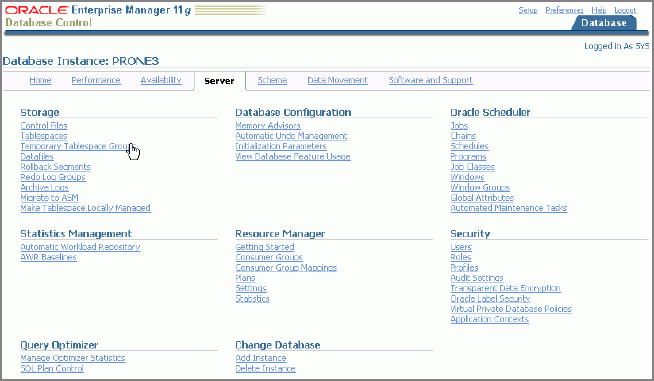
Manager. To examine the baselined plans, bring up EM and click on
the tab "Server" as shown in figure below:
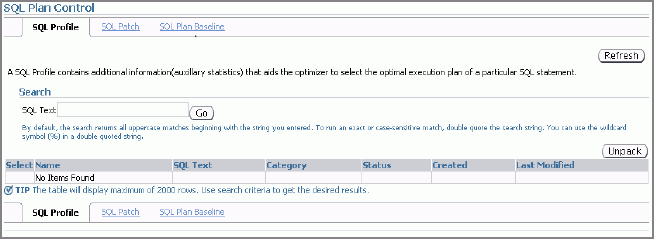
From this page, click SQL Plan
Control in
the section Query Optimizer, which brings up the main SPM page shown
below:
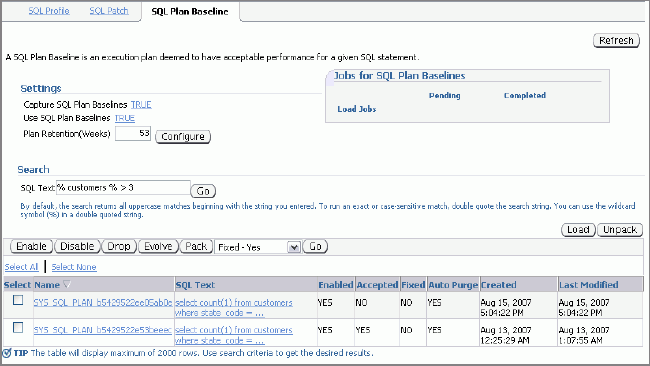
Click the SQL Plan
Baseline tab,
which brings up a screen similar to as shown below:
This is the main SQL Plan Baseline screen. At the top left corner,
you will see the configuration parameters. It shows Capture SQL Plan Baselines as TRUE, which is what you
enabled with the ALTER SYSTEM command. Below that is the Use SQL Plan Baselines set toTRUE (the default). It
indicates that SQL Plan Baselines are to be used for a query if one
is available.
Whenever a new plan is generated for the query, the old plan is
retained in the history in the SMB. However, it also means that the
SMB will be crowded with plan histories. A parameter controls how
many weeks the plans are retained for, which is shown in the text
box against Plan
Retention (Weeks). In this screen it shows as set to 53 weeks. If a SQL Plan
Baseline has not been used for 53 weeks it will be purged
automatically.
The middle part of the screen has a search box where you can search
for SQL statements. Enter a search string here and press Go, you will see the SQL
statements and associated plans as shown in the figure above. Each
baselined plan has a lot of status information associated with it.
Let's see what they are:
- Enabled - A baselined plan has to be enabled to be
considered
- Accepted - A baselined plan is considered to an be
acceptable plan for a query
- Fixed - If a plan is marked as FIXED, then the
optimizer considers only that in deciding the best plan. So, if
five plans are baselined for a query and three are marked
"fixed", then the optimizer considers only those three in
choosing the best plan.
- Auto-Purge - If the plan should be purged
automatically
The same information and more is also available in the view
DBA_SQL_PLAN_BASELINES:
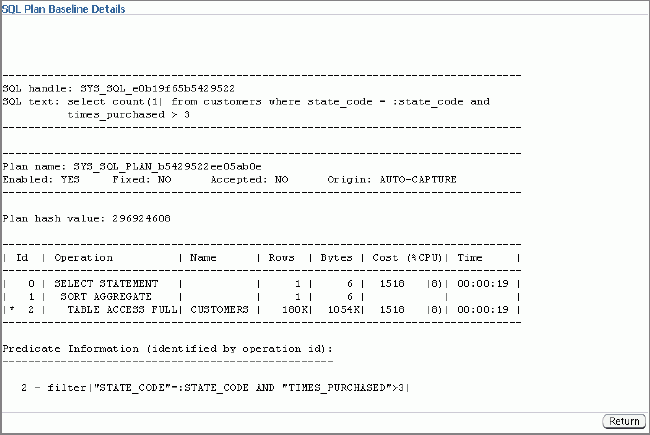
If you click the plan name, it will show you the plan details. Here
is an output:
In the details you can see the explain plan of the query, along with
the other relevant details such as whether the plan is accepted,
enabled, fixed, and so on. Another important attribute is "Origin",
which shows AUTO-CAPTURE—meaning
the plan was captured automatically by the system because
optimizer_capture_sql_plan_baselines was set to TRUE.
Click Return to get back to the list
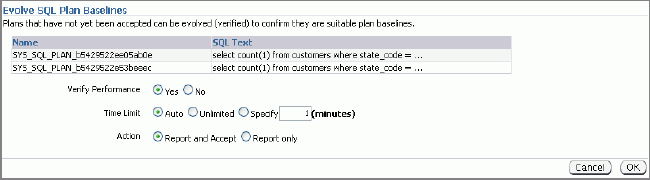
of plans as shown in the previous figure. Now select a plan whose
status is not accepted and clickEvolve to see if the plan
should be examined for a potentially better plan. The following
screen comes up.
The important point to note in this screen is the Verify Performance radio button. If you
want to examine the plans and compare its performance to that of the
existing SQL Plan Baseline for the query, you should select that.
Click OK.
This shows the report of the comparison:
-------------------------------------------------------------------------------
                        Evolve SQL Plan Baseline Report
-------------------------------------------------------------------------------

Inputs:
-------
  PLAN_LIST  = SYS_SQL_PLAN_b5429522ee05ab0e
               SYS_SQL_PLAN_b5429522e53beeec
  TIME_LIMIT = DBMS_SPM.AUTO_LIMIT
  VERIFY     = YES
  COMMIT     = YES

Plan: SYS_SQL_PLAN_b5429522e53beeec
-----------------------------------
  It is already an accepted plan.

Plan: SYS_SQL_PLAN_b5429522ee05ab0e
-----------------------------------
  Plan was verified: Time used 3.9 seconds.
  Failed performance criterion: Compound improvement ratio <= 1.4.

                      Baseline Plan      Test Plan     Improv. Ratio
                            -------------          ---------           -------------
  Execution Status:        COMPLETE       COMPLETE
  Rows Processed:                 1              1
  Elapsed Time(ms):            3396            440              7.72
  CPU Time(ms):                1990            408              4.88
  Buffer Gets:                 7048           5140              1.37
  Disk Reads:                  4732             53             89.28
  Direct Writes:                  0              0
  Fetches:                     4732             25            189.28
  Executions:                     1              1
This is a pretty good comparison report that shows how the plans
compare. If a specific plan is shown to perform better, then the
optimizer will use it. If the new plan does not show an appreciable
performance improvement, then it should not be accepted and be used.
SQL Performance Management allows you to see first hand how the
plans compare and use the ones that are truly better.
You can change the accepted status of a plan manually by executing
the DBMS_SPM package:
declare
   ctr binary_integer;
begin
   ctr := dbms_spm.alter_sql_plan_baseline (
      sql_handle      => 'SYS_SQL_e0b19f65b5429522',
      plan_name       => 'SYS_SQL_PLAN_b5429522ee05ab0e',
      attribute_name  => 'ACCEPTED',
      attribute_value => 'NO'
   );
end;
You can disable a SQL Plan Baseline so that it does not get used by
the optimizer. Later you can re-enable the plan so that it gets used
again. To disable, use this:
declare
   ctr binary_integer;
begin
   ctr := dbms_spm.alter_sql_plan_baseline (
      sql_handle      => 'SYS_SQL_e0b19f65b5429522',
      plan_name       => 'SYS_SQL_PLAN_b5429522ee05ab0e',
      attribute_name  => 'ENABLED',
      attribute_value => 'NO'
   );
end;
When a specific SQL statement's plan is fixed by a baseline, the
explain plan shows it clearly. At the end of the plan you will see a
line that confirms that the plan has been fixed by a baseline.
Memory
Management
Deep down, an Oracle Database Instance is a collection of
processes such as PMON, SMON, and memory areas such as System
Global Area (SGA) and Program Global Area (PGA). Within the SGA,
there are several sub areas such as database cache, the large pool
and so on. How do you decide how big each area should be? Memory
in the host is bounded at an upper limit, of which some parts must
go to the Operating System. Deciding how much to allocate where
could be tough.
In Oracle Database 10g, the issue is greatly simplified by setting
a value for SGA_TARGET, which allocates a specified value for the
overall SGA memory area. The sub-areas such as cache and shared
pool are subsequently auto-tuned.
However, in 10g some components, such as db_cache_keep_size, are
not; you still have to manually tune them. The memory area PGA is
entirely outside the SGA, so the former is not touched by the
Automatic SGA Management feature at all. So, you still have to
make a few decisions, such as the sizes of SGA and of PGA.
What happens if you allocate too much to PGA, starving the SGA?
Well, you waste memory while making performance suffer due to
undersized SGA. But what if the boundary between PGA and SGA were
fluid and the memory allowed to flow freely between them as and
when needed? That would be a very desirable feature indeed.
In Oracle Database 11g, that precise functionality is provided.
Instead of setting SGA_TARGET and PGA_AGGREGATE_TARGET, you
specify MEMORY_TARGET. From the Enterprise Manager Database
homepage, choose Advisor Central > Memory Advisor and then
click Enable to enable Automatic Memory Management. Finally click
OK. You will need to restart the database, as the parameter for
Max Memory Target is a static one.
You can also do this via the command line:
SQL> alter system set memory_max_target = 1G scope=spfile;
SQL> alter system set memory_target = 1G scope =
spfile;
In UNIX-based systems, the max memory should be less than the size
of the /dev/shm shared memory file system. This functionality has
been implemented in Linux, Solaris, HPUX, AIX and Windows.
[oracle@oradba3 dbs]$ df -k
Filesystem
1K-blocks Used Available Use%
Mounted on
/dev/mapper/VolGroup00-LogVol00
36316784 19456684 15015264 57% /
/dev/hda1
101086
9632 86235 11% /boot
none
517448 131448 386000
26% /dev/shm
This example shows that you have only about 500MB available, so
you will use 404MB as the MEMORY_TARGET.
This allocation keeps changing as the apps demands from the
database. This relieves you from managing memory, which may be a
best-case guess anyway.
When the demand for the memory goes up and down, the memory areas
are shrunk and expanded. You can check it from the view
V$MEMORY_DYNAMIC_COMPONENT.
set linesize 150
select substr(component,1,20) component, current_size, min_size,
max_size,
user_specified_size
user_spec, oper_count, last_oper_type,
last_oper_time
from v$memory_dynamic_components
where current_size != 0;
Here is the output:
COMPONENT
CURRENT_SIZE MIN_SIZE MAX_SIZE
USER_SPEC OPER_COUNT LAST_OPER_TYP LAST_OPER_TIME
-------------------- ------------ ---------- ----------
---------- ---------- ------------- ------------------
shared
pool
721420288 654311424
738197504
0 17
GROW
27/SEP/13 22:01:19
large
pool
16777216 16777216
16777216
0 0 STATIC
java
pool
16777216 16777216
16777216
0 0 STATIC
streams
pool
16777216 16777216
16777216
0 0 STATIC
SGA
Target
1224736768 1224736768
1224736768
0 0 STATIC
DEFAULT buffer cache 436207616
419430400
503316480
0 17
SHRINK 27/SEP/13
22:01:19
PGA
Target
637534208 637534208
637534208
0 0 STATIC
Another very useful view is v$memory_resize_ops, which stores the
information about the resize operations that occurred.
select start_time, end_time,
status,
substr(component,1,20) Component,
oper_type Op, oper_mode,
substr(parameter,1,20) Parameter,
initial_size, target_size,
final_size
from v$memory_resize_ops
where final_size != 0
order by 1,2;
SQL
Access Advisor
Oracle Database 10g offers an avalanche of
helpers—or "advisors"—which help you decide the best course of
action. One example is SQL Tuning Advisor, which provides
recommendations on query tuning, lengthening the overall
optimization process a bit in the process.
But consider this tuning scenario: Say an index will definitely help
a query but the query is executed only once. So even though the
query will benefit from it, the cost of creating the index will
outweigh that benefit. To analyze the scenario in that manner, you
would need to know how often the query is accessed and why.
Another advisor—SQL Access Advisor—performs this type of analysis.
In addition to analyzing indexes, materialized views, and so on as
it does in Oracle Database 10g, in Oracle Database 11g SQL Access Advisor also
analyzes tables and queries to identify possible partitioning
strategies—a great help when designing optimal schema. In Oracle
Database 11g SQL Access Advisor can
now provide recommendations with respect to the entire workload,
including considering the cost of creation and maintaining access
structures.
In this installment you will see how a typical problem is solved by
the new SQL Access Advisor. (Note: For the purposes of this demo a
single statement will illustrate this functionality; however, Oracle
recommends that SQL Access Advisor be used to help tune your entire
workload, not just one SQL statement.)
The Problem
Here's a typical problem. The SQL statement below is issued by the
application. The query seems resource intensive and slow.
select store_id, guest_id, count(1) cnt
from res r, trans t
where r.res_id between 2 and 40
and t.res_id = r.res_id
group by store_id, guest_id;
This SQL touches two tables, RES and TRANS; the latter is a child
table of the former. You have been asked to find solutions to
improve query performance—and SQL Access Advisor is the perfect tool
for the job.
You can interact with the advisor either via command line or Oracle
Enterprise Manager Database Control, but using the GUI provides
somewhat better value by letting you visualize the solution and
reducing many tasks to simple pointing and clicking. To solve the
problem in the SQL using SQL Access Advisor in Enterprise Manager,
follow the steps below.
- The first task is, of course, to fire up Enterprise
Manager. On the Database Homepage, scroll down to the bottom of
the page where you will see several hyperlinks, as shown in the
figure below:

- From this menu, click on Advisor
Central, which brings up a screen similar to that
below. Only the top portion of the screen is shown.

- Click on SQL
Advisors, which brings up a screen similar to that
below:

- In this screen, you can schedule a SQL Access Advisor
session and specify its options. The advisor must gather some
SQL statements to work with. The simplest option is to get them
from the shared pool, via Current and Recent SQL Activity.
Choosing this option allows you to get all SQL statements cached
in the shared pool for analysis.
However, in some cases you may not want all the statements in
the shared pool; just a specific set of them. To do so, you need
to create a "SQL Tuning Set" on a different screen and then
refer to the set name here, in this screen.
Alternatively, perhaps you want to run a synthetic workload
based on a theoretical scenario you anticipate to occur. These
types of SQL statements will not be present in the shared pool,
as they have not executed yet. Rather, you need to create these
statements and store them in a special table. In the third
option ( Create
a Hypothetical Workload...), you need to supply the
name of this table along with the schema name.
For the purpose of this article, assume you want to take the
SQLs from the shared pool. So, choose the first option as shown
in the screen, which is default.
- However, you may not want all the statements, just some key
ones. For instance, you may want to analyze the SQL executed by
the user SCOTT, which is the application user. All other users
probably issue ad hoc SQL statements and you want to exclude
them from your analysis. In that case, click on the "+" sign
just before Filter
Options as
shown in the figure below.

- In this screen, enter SCOTT in the text box where it asks
to enter the users, and choose the radio button Include
only SQL...(default). Similarly, you can exclude some
users. For instance, you may want to capture all activity in the
database except the users SYS, SYSTEM ,and SYSMAN. You will
enter these users in the text box and click the button Exclude
all SQL statements... .
- You can filter on tables accessed in statements, on Module
Ids, Actions, and even specific strings in the SQL statements.
The idea is to confirm that only the statements of interest are
analyzed. Choosing a small subset of the entire SQL cache makes
the analysis faster. In this example, we assumed there is only
one statement issued by the user SCOTT. If that is not the case
you can put additional filtering conditions to reduce the
analyzed set to only one SQL, the one mentioned in the original
problem statement.
- Click Next.
This brings up a screen shown below (only top portion shown):

- In this screen you can specify what types of
recommendations should be searched. For instance, in this case,
we want the advisor to look at potential indexes, materialized
views, and partitioning, so check all the boxes next to these
terms. For Advisor Mode, you have a choice; the default, Limited
Mode, acts on only high-cost SQL statements. It will be faster,
of course, and will yield better bang for the buck. For analysis
of all SQL, use the Comprehensive Mode. (In this example the
choice of modes is irrelevent because you have only one SQL.)
- The bottom half of the screen shows advanced options such
as how the SQL statements should be prioritized, the tablespaces
used, and so on. You can leave the defaults as marked (more on
those later).Click Next,
which bring up the scheduling screen. Choose Run
Immediately and
click Next.
- Click Submit.
This creates a Scheduler job. You can click on the job hyperlink
shown in this screen, at the top of the page. The job will be
shown as Running.
- Click Refresh repeatedly until
you see the value under the column Last
Run Status change
to SUCCEEDED.
- Now go back to the Database Homepage and click on Advisor
Central as
you did in Step 1. Now you will see the SQL
Access Advisor row
as shown in the figure below:

- This screen indicates that the SQL Access Advisor task is COMPLETED.
Now click on the button View
Result. The screen is shown below:

- This screen says it all! SQL Access Advisor analyzed the
SQL statement and found some solutions that can improve query
performance tenfold. To see what specific recommendations were
made, click on the Recommendations tab, which brings
up a details screen as shown below.

- This screen has a lot of good information, at a slightly
higher level. For instance, for the statement with ID = 1 there
are two recommended actions, under column Actions. The following
column, Action Types, shows the types of actions, indicated by
colored squares. From the icon guide just below it, you can see
that the actions were on indexes and partitions. Together they
improve performance by several orders of magnitude.
To see exactly what SQL statement can be improved, click on the
ID, which brings up the screen below. Of course, this analysis
had only one statement so only one showed up here. If you had
more than one, you would see them all.

- On the screen above note the column Recommendation ID.
Click on the hyperlink, which brings up the detailed
recommendations as shown below:

- The screen offers a very clear description of the
solutions. It has two recommendations: to create the table as
partitioned and to use an index. Then it finds that the index is
already present so it advises to retain the index.
If you click on PARTITION
TABLE under
the column Action, you will see the actual script Oracle will
generate to make this a partitioned table. Before you click,
however, fill in the tablespace name in the text box. This
allows SQL Access Advisor to use that tablespace while building
this script:
Rem
Rem Repartitioning table "SCOTT"."TRANS"
Rem

SET SERVEROUTPUT ON
SET ECHO ON

Rem
Rem Creating new partitioned table
Rem
CREATE TABLE "SCOTT"."TRANS1"
(    "TRANS_ID" NUMBER,
    "RES_ID" NUMBER,
    "TRANS_DATE" DATE,
    "AMT" NUMBER,
    "STORE_ID" NUMBER(3,0)
) PCTFREE 10 PCTUSED 40 INITRANS 1 MAXTRANS 255 NOCOMPRESS LOGGING
TABLESPACE "USERS"
PARTITION BY RANGE ("RES_ID") INTERVAL( 3000) ( PARTITION VALUES LESS THAN (3000)
);

begin
dbms_stats.gather_table_stats('"SCOTT"', '"TRANS1"', NULL, dbms_stats.auto_sample_size);
end;
/

Rem
Rem Copying constraints to new partitioned table
Rem
ALTER TABLE "SCOTT"."TRANS1" MODIFY ("TRANS_ID" NOT NULL ENABLE);

Rem
Rem Copying referential constraints to new partitioned table
Rem
ALTER TABLE "SCOTT"."TRANS1" ADD CONSTRAINT "FK_TRANS_011" FOREIGN KEY ("RES_ID")
     REFERENCES "SCOTT"."RES" ("RES_ID") ENABLE;

Rem
Rem Populating new partitioned table with data from original table
Rem
INSERT /*+ APPEND */ INTO "SCOTT"."TRANS1"
SELECT * FROM "SCOTT"."TRANS";
COMMIT;

Rem
Rem Renaming tables to give new partitioned table the original table name
Rem
ALTER TABLE "SCOTT"."TRANS" RENAME TO "TRANS11";
ALTER TABLE "SCOTT"."TRANS1" RENAME TO "TRANS";
- The script actually builds a new table and then
renames it to match the original table.
- The final tab, Details, show some interesting details on
the task. Although they are not important for your analysis,
they can offer valuable clues about how the advisor arrived at
those conclusions, which can help your own thinking process. The
screen has two parts, the first part being Workload
and Task Options, shown below.
- The lower half of the screen shows a sort of run-log
of the task. Sometimes the advisor cannot process all SQL
statements. If some SQL statements are discarded, it shows up
here, against the Invalid
SQL String: Statements discarded count. If you are
wondering how why only a few of the several SQL statements were
analyzed, here lies the reason.
Advanced Options
In Step 10 above, I made a reference to advanced settings. Let's see
what these settings do.
Click on the plus sign just left of Advanced Options, which
brings up a screen as shown below:
This screen allows you to enter the name of the tablespace where the
index will be created, which schema it will be created on, and so
on. For partitioning advice, you can specify the tablespace the
partitions will go to and so on.
Perhaps the most important element is the checkbox Consider access structures
creation costs recommendations. If you check this box,
SQL Access Advisor will take into consideration the cost of the
creation of the index itself. For example, should 10 new indexes
potentially be involved, the associated cost may lead SQL Access
Advisor to not advise their creation.
You can also specify the maximum size of the index in this screen.
Differences vs. SQL Tuning Advisor
In the introduction I only briefly described how this tool differs
from SQL Tuning Advisor, so let's go into more detail here. A quick
demo will best explain the differences.
From the SQL
Advisors screen,
choose SQL
Tuning Advisor and
run it. After it is completed, here is part of the screen that shows
the results:
Now if you click View to examine the
recommendations, it brings up a screen as shown below:
Examine the recommendation carefully: it is to create an index on
TRANS on the column RES_ID. SQL Access Advisor, however, did not
make that specific recommendation. Instead it recommended to
partition the table, the reason being: Based on the access patterns
and the data available, SQL Access Advisor determined that
partitioning is more efficient than building an index on the column.
This is a more "real world" recommendation than that provided by SQL
Tuning Advisor.
The recommendations made by SQL Tuning Advisor map to one of four
objectives:
- Gather statistics for objects that have missing or
stale statistics
- Account for any data skew, complex predicates, or
stale statistics by the optimizer
- Restructure the SQL for optimizing performance
- Make new index recommendations
These recommendations are with respect to only a single statement,
not the entire workload. Therefore SQL Tuning Advisor should be used
on high-load or business critical queries occasionally. Note that
this advisor only recommends indexes that offer significant
improvement in performance, compared to SQL Access Advisor, which
may have more lenient standards. And of course, the former does not
have a partition advisor in it.
Use Cases
SQL Access Advisor is useful for tuning schemas, not just queries.
As a best practice, you can use this strategy in developing an
effective SQL tuning plan:
- Search for high-cost SQL statements, or better yet,
evaluate the entire workload.
- Put suspect statements into a SQL Tuning Set.
- Analyze them using both SQL Tuning Advisor and SQL Access
Advisor.
- Get the results of the analysis; note the recommendations.
- Plug the recommendations into SQL Performance Analyzer (see this installment).
- Examine the before-and-after changes in SQL Performance
Analyzer and arrive at the best solution.
- Repeat the tasks until you get the optimal schema design.
- When you have the best schema design, you may want to lock
the plan using SQL Plan Management baselines (described in this installment).
Automatic
Health Monitor
How do you know if your database is humming along smoothly? Well,
one way is to check "everything"—a rather time-consuming and
error-prone process. In some shops dedicated DBAs perform the same
task over and over to assess and report the health of the database,
but most can't afford to hire full time staff for this effort. The
alternative is to have the regular DBA staff perform health checks,
but the result is usually not very encouraging. Dividing one's
attention across too many things can lead to missing something
potentially dangerous.
In Oracle Database 11g the
effort has become somewhat simpler with the introduction of the
Automatic Health Monitor. Similar to the Advisors introduced in
Oracle Database 10g,
the Automatic Health Monitor "checkers" monitor (automatically after
a failure or on demand) various components, such as the datafiles
and dictionary, to make sure they are not corrupted physically or
logically. When the checkers find something, the information is
reported and then may be fed to various recovery advisors. At a
minimum, the new Incident Packaging Service (described later) allows
you to make a bundle of all issues and supporting files for easier
reporting to Oracle Support.
Like many other features of Oracle Database 11g, this process can be
managed either from the command line or via the Oracle Enterprise
Manager GUI. Here you'll see how it's done with the latter.
On the main Database page, scroll all the
way down to the section marked Related
Links as
shown below.

From this list of hyperlinks, click on Advisor Central, which brings up
the Advisors and Checkers screen. Click on the
tab labeledCheckers. The top portion of the screen is shown below.

This is a very important screen that shows the
multiple checkers available as well as the automated checker runs
that have been executed.
First, let's focus on the multiple checkers available.
DB Structure Integrity Check. This checker is best
explained through an example. First click on DB Structure Integrity Checks,
which brings up a small screen where you can name the run as
"DB_Struct_Int1", as an example. The other input you make here is to
time-limit the run, which you may ignore to effectively state that
there is no limit.
After the health check runs successfully, the confirmation comes up
as shown in the top portion of the screen, shown below:

The lower
portion of the screen also shows the run that was just made. The
name is what you entered earlier: DB_Struct_Int1. The important
difference is the column Run Type, which shows "Manual" for this run,
as opposed to "Reactive" for others. You can choose this run by
ticking the radio button to the left and then clicking on the
button labeled Details. The resulting screen shows the
details of the run, such as what type of damage was detected and
so on.
In this case, a datafile was somehow corrupted and this checker will
identify that. The information is then fed to the Data Recovery
Advisor to take appropriate action. You can invoke this checker any
time to check the datafile's integrity.
Your most popular checker will most likely be this one. On the
screen that shows the past runs, choose any run of that type and
click on the Details button, and you will
see the screen as shown below:

This screen shows all the findings on this issue:
datafile #7 has become corrupt. You can launch the Recovery
Advisor if you wish to get advice on what needs to be done next.
Data
Block Integrity Checker. Data Block Integrity
Checker is similar to DB Structure Integrity Check but checks only
specific blocks rather than the entire file. As previously, you give
it a name and other relevant details. Here is what the screen looks
like:

Note that you have to enter the datafile number and
the block number. (I entered 7 and 20 respectively.) After
entering the details, pressOK. This starts the check process and the lower
portion will reflect the status of the run as shown below:

Again, if there were a problem with the block, the
checker would have found it. Using the hyperlink you could
navigate to the details page to learn about the issues.
Redo
Integrity Check. This
checker scans the contents of the redo and archive logs for
accessibility and corruption.
Undo Segment Integrity Check. This check finds
logical undo corruptions, which are sometimes identified during
rollback operations. After locating an undo corruption, this check
uses PMON and SMON to try to recover the corrupted transaction. If
this recovery fails, then Automatic Health Monitor stores
information about the corruption in V$CORRUPT_XID_LIST. Most undo
corruptions can be resolved by forcing a commit.
Transaction Integrity Check. Transaction Integrity
Check is almost identical to Undo Segment Check except that it
checks only one specific transaction, which is passed to the check
as an input parameter. After locating an undo corruption, this check
uses PMON and SMON to try to recover the corrupted transaction. If
this recovery fails, then Automatic Health Monitor stores
information about the corruption in V$CORRUPT_XID_LIST. Most undo
corruptions can be resolved by forcing a commit.
Dictionary Integrity Check. This check examines the
integrity of core dictionary objects, such as tab$ and col$. It
verifies the contents of dictionary entries for each dictionary
object, that logical constraints on rows in the dictionary are
enforced, and that parent-child relationships between dictionary
objects are enforced.
Automatic Health Checks
Remember the Checkers main screen? Note the list of Checker Runs at the bottom of the
page, which shows the various checker runs that have occurred and
their Run Type. If you had run a checker manually, as you did
earlier in this section, the Run Type would show "Manual". Checker
runs listed as "Reactive" means they were run automatically when
an error was detected somewhere. If the run finds something, it is
recorded and you can access the findings by clicking on these
hyperlinks. For instance, clicking on the first run,
HM_RUN_140013, will show the details of that checker run:
The screen clearly shows the cause of the failure.
Actually there are at least two types of failure: a corrupt online
redo log file as well as a datafile. The first thing you would
want to do is to ask for advice by clicking the button Launch Recovery Advisor. After continuing
through the wizard-based interface, you will come to a screen
where the advisor directs you to perform a specific action:

The action would be to run the SQL file
reco_767216331.hm in the directory
/home/oracle/diag/rdbms/odel11/ODEL11/hm. If you open the file,
you will see the contents:
begin
/*Clear the Log Group*/
execute immediate 'ALTER DATABASE CLEAR LOGFILE GROUP 3';
end;
The corrupt logfile belongs to a group that is not
active so it will be fine to clear them—and that was the advice
from the Recovery Advisor. If you decide to go ahead with the
advice, press the Continue button and the
recovery will continue. After that is completed, if you go back to
Support Workbench, you will see that the redo corruption is gone
but a new corruption in an archive log has been detected.

As usual, you can launch the advisor to fix those
errors.
Automatic
Diagnostic Repository
When the checkers find something, they need to
record it somewhere for further analysis and subsequent
processing. All this metadata is recorded in a new facility called
Automatic Diagnostic Repository that records all critical events,
not just those detected by checkers. It's like the SYSTEM
tablespace of the critical events in the database. Let's see how
you can use it via the Enterprise Manager.
From the Enterprise Manager
main Database page, click on the tab named Software
and Support and
then click on Support
Workbench, which brings up a screen similar to the one
shown below.

This shows just a summary as reported by the
checkers: ORA-603 errors have occurred. Click on the + sign to the
left of the error and the details of those errors show up.

If you click on the link corresponding to each
incident id under the Incidents heading, you can view
the incidents. For instance, take the example of the incident
14435. Clicking on the link brings up the details of the incident
in a screen shown below:

The top portion of the screen shows the details that
are probably self-explanatory. The lower portion of the screen
shows the supporting details of the incident such as trace files.
These files are sent over to Oracle Support for analysis (but only
if you use the Incident Packaging Service to package them and have
Oracle Configuration Manager configured with proper credentials).
Click on the eyeglass icon next to the first trace file, which
brings up the trace file as shown below:

Note how the lines in the file are parsed and
presented in a very user-friendly manner. Enterprise Manager reads
each line, identifies the dependent lines, and presents them
properly indented. If you click on the hyperlinks in the file, you
will see the raw section from the trace file.
You can combine the
incidents into one "envelope" to be sent to Oracle Support and
that's what you should do next: package them. To do this, click
inside the check box under Select and click on the
button labeled Package.
This brings up a screen similar to one shown below:

For now, ignore Custom Packaging. Click on Quick Packaging and press Continue, which brings up
a screen such as the following:

Enter all the details and press Next. The subsequent screens confirm what is being
packaged, the manifest of the package, and so on. Here you see
that all relevant trace files associated with the error have been
identified and added to the package. This process saves you from
the error-prone task of identifying the correct set of trace files
for a particular error, and the tool also has the intelligence to
gather trace files of related errors in the same package. This is
important because trace files of all related errors are needed by
Oracle to determine the root cause of the problem; the error that
you decided to package may be a symptom and not the root cause.
Finally, you can press Submit to send it to Oracle.
Once you submit, the screen looks a bit different, as shown below:

Note how there is an entry under the Packaged column now ("Yes").
This confirms that the incidents were packaged. Note one more
section:

This shows that the upload file was generated along
with corresponding details like when it was generated, the main
issue that is in the package, and so on. However the file was not
uploaded to Oracle Support because you have either not installed
or not configured the Configuration Manager yet. You will learn
about that feature later; for now, if you click on the name, you
will see more details about the package:

The details are all self-explanatory. The incidents
are all shown with hyperlinks, which, when clicked, will go to the
incident page you have seen earlier. Clicking on the tab labeled Files brings you to the
page that shows all the files contained in the package. A little
eyeglass icon on the far right means that you can view the files
by clicking on them.

Click on the Activity Log tab now, which will
show you the history of the package, when it was created, when it
was sent to Oracle (if it was), and so on.

SKIP LOCKED for
locked tables
Oracle 11g introduced SKIP LOCKED clause to query the records from
the table which are not locked in any other active session of the
database. This looks quite similar to exclusive mode of locking. The
SQL statement in the Example code queries the unlocked records from
EMP table:
So this is our master table:
select empno, ename, job, sal from emp order by sal;
EMPNO
ENAME
JOB
SAL
---------- ---------- --------- ----------
7369
SMITH
CLERK
800
7900
JAMES
CLERK
950
7876
ADAMS
CLERK
1100
7521
WARD
SALESMAN 1250
7654
MARTIN
SALESMAN 1250
7934
MILLER
CLERK
1300
7844
TURNER
SALESMAN 1500
7499
ALLEN
SALESMAN 1600
7782
CLARK
MANAGER 2450
7698
BLAKE
MANAGER 2850
7566
JONES
MANAGER 2975
7788
SCOTT
ANALYST 3000
7902
FORD
ANALYST 3000
7839
KING
PRESIDENT 5000
If from Session 1 I execute the following, I will be locking 5 rows
with SAL higher than 1000:
SELECT empno, ename, job, sal FROM EMP where sal > 1000 and
rownum <= 5 for update;
EMPNO
ENAME
JOB
SAL
---------- ---------- --------- ----------
7499
ALLEN
SALESMAN 1600
7521
WARD
SALESMAN 1250
7566
JONES
MANAGER 2975
7654
MARTIN
SALESMAN 1250
7698
BLAKE
MANAGER 2850
Now if on Session 2 I execute this code:
SELECT empno, ename, job, sal FROM EMP where sal > 1000 and
rownum <= 5 for update;
Usually that session will need to wait until the rows are commited
or rollbacked from Session 1.
Instead of that, I can use the new option SKIP LOCKED. That option
will search for the NEXT 5 items available for update instead of
waiting for ever
SELECT empno, ename, job, sal FROM EMP where sal > 1000 and
rownum <= 5 for update skip locked;
Read Only Tables
In Oracle 11g, a table can be set READ ONLY mode to restrict write
operations on the table. A table can be altered to toggle over READ
ONLY and READ WRITE modes. Examples:
SQL> ALTER TABLE EMP READ ONLY;
SQL> ALTER TABLE EMP READ WRITE;
Virtual Columns
Oracle 11g allows a user to create
virtual columns in a table whose values are derived automatically
from other actual columns of the same table. They show same behavior
as other columns in the table in terms of indexing and statistics.
Currently, Oracle does not support LOB and RAW values in virtual
columns.
A Virtual column DATA is NOT PHYSICALLY STORED. You CAN NOT
explicitly write to a virtual column.
You CAN create a PHYSICAL index (result is function-based index) or
partition on a virtual column <unlike a computed column in SQL
Server or other databases>
If you UPDATE columns of a virtual column and it has an index, then
it will be computed on the UPDATE vs. on the SELECT (very important
from a tuning standpoint).
Index Organized and External Tables can NOT have virtual columns.
Example Syntax:
column [datatype] [GENERATED ALWAYS] AS (
)
[VIRTUAL] [( inline_constraint [,...] )]
Here, GENERATED ALWAYS and VIRTUAL are optional keywords, but
included for more clarity.
A table ORDERS is created with ORDER_VAL_ANN as virtual column,
whose value is derived from ORDER_VAL column of the ORDERS table.
Example code :
create table emp_rich
(empno number(4),
sal number(7,2),
yearly_sal generated always as (sal*12),
deptno number(2));
insert into emp_rich(empno, sal, deptno) select
empno, sal, deptno from scott.emp;
select * from emp_rich;
EMPNO
SAL
YEARLY_SAL
DEPTNO
------------ ----------- -------------------
----------------
7369
800
9600
20
7499
1600
19200
30
7521
1250
15000
30
7566
2975
35700
20
7654
1250
15000
30
7698
2850
34200
30
Result Cache in SQL and PL/SQL
Accessing memory is far quicker than accessing hard drives, and that
will most likely be the case for next several years unless we see
some major improvements in hard drive architecture. This fact gives
rise to caching: the process of storing data in memory instead of
disks. Caching is a common principle of Oracle database
architecture, in which users are fed data from the buffer cache
instead of the disks on which the database resides.
The advantage of caching is singularly visible in the case of
relatively small tables that have static data—for example, reference
tables such as STATES, PRODUCT_CODES, and so on. However, consider
the case of a large table named CUSTOMERS that stores the customers
of a company. The list is relatively static but not entirely so; the
table changes rarely, when the customers are added or removed from
the list.
Caching would probably provide some value here. But if you were to
cache the table somehow, how would you make sure you get the correct
data when something changes?
Oracle Database 11g has the answer: with the SQL Result Cache.
Consider the following query. Run it to get the execution statistics
and the response times:
SQL> set autot on explain stat
select state_code, count(*),
min(times_purchased), avg(times_purchased)
from customers
group by state_code;
The results are:
ST COUNT(*) MIN(TIMES_PURCHASED)
AVG(TIMES_PURCHASED)
-- ---------- -------------------- --------------------
NJ
1
15
15
NY
994898
0
15.0052086
CT
5099
0
14.9466562
MO
1
25
25
FL
1
3
3
5 rows selected.
Elapsed: 00:00:02.57
Execution Plan
----------------------------------------------------------
Plan hash value: 1577413243
--------------------------------------------------------------------------------
| Id |
Operation |
Name | Rows | Bytes | Cost
(%CPU)| Time |
--------------------------------------------------------------------------------
| 0 | SELECT STATEMENT
|
| 5 | 30 |
1846 (25)| 00:00:23 |
| 1 | HASH GROUP
BY
|
| 5 | 30 |
1846 (25)| 00:00:23 |
| 2 | TABLE ACCESS FULL| CUSTOMERS
| 1000K| 5859K| 1495 (7)| 00:00:18 |
--------------------------------------------------------------------------------
Statistics
----------------------------------------------------------
1 recursive calls
0 db block gets
5136 consistent
gets
5128 physical
reads
0 redo size
760 bytes
sent via SQL*Net to client
420 bytes
received via SQL*Net from client
2 SQL*Net roundtrips to/from client
0 sorts (memory)
0 sorts (disk)
5 rows processed
Note a few things:
- The explain plan shows that a full table scan was performed.
- There are 5,136 consistent gets (logical I/Os).
- It took 2.57 seconds to execute.
Since the table is pretty much unchanged, you can use a hint that
stores the results of the query to be cached in the memory:
select /*+ result_cache */ state_code,
count(*), min(times_purchased),
avg(times_purchased)
from customers
group by state_code;
The query is identical to the first one except for the hint. The
result (the second execution of this query):
ST COUNT(*) MIN(TIMES_PURCHASED)
AVG(TIMES_PURCHASED)
-- ---------- -------------------- --------------------
NJ
1
15
15
NY
994898
0
15.0052086
CT
5099
0
14.9466562
MO
1
25
25
FL
1
3
3
5 rows selected.
Elapsed: 00:00:00.01
Execution Plan
----------------------------------------------------------
Plan hash value: 1577413243
--------------------------------------------------------------------------------------------------
| Id |
Operation
|
Name
| Rows | Bytes | Cost (%CPU)| Time |
--------------------------------------------------------------------------------------------------
| 0 | SELECT STATEMENT
|
| 5 | 30 |
1846 (25)| 00:00:23 |
| 1 | RESULT
CACHE |
gk69saf6h3ujx525twvvsnaytd |
|
|
| |
| 2 | HASH GROUP
BY
|
| 5 | 30 |
1846 (25)| 00:00:23 |
| 3 | TABLE ACCESS FULL|
CUSTOMERS
| 1000K| 5859K| 1495 (7)| 00:00:18 |
--------------------------------------------------------------------------------------------------
Result Cache Information (identified by operation id):
------------------------------------------------------
1 - column-count=4;
dependencies=(ARUP.CUSTOMERS); parameters=(nls);name="select /*+
result_cache */
state_code,
count(*),
min(times_purchased),
avg(times_purchased)
from customers
group by state_c"
Statistics
----------------------------------------------------------
0 recursive calls
0 db block gets
0 consistent gets
0 physical reads
0 redo size
760 bytes
sent via SQL*Net to client
420 bytes
received via SQL*Net from client
2 SQL*Net roundtrips to/from client
0 sorts (memory)
0 sorts (disk)
5 rows processed
Note several differences from the first case.
- The response time is now 0.01 seconds instead of almost 3
seconds earlier.
- Consistent gets is now 0; no logical I/O was performed for
this query. (Actually, the first time the query runs with the
hint in place the logical I/O will remain steady because the
database has to perform the I/O to build the cache. Subsequent
invocations will serve data from the cache, making the logical
I/O none.)
- The explain plan shows RESULT CACHE as an operation.
- The note after the explain plan shows what type of caching was
performed and on which result.
The savings in time is phenomenal: from 3 seconds virtually nothing!
This is thanks to the fact that with the second query, where we used
a cache, the results came back straight from database memory (the
result cache), not after the execution of the query.
SQL Result Cache is another cache in the SGA, just like buffer cache
or program global area. When you execute a query with the hint
result_cache, Oracle performs the operation just like any other
operation but the results are stored in the SQL Result Cache.
Subsequent invocations of the same query do not actually go to the
table(s) but get the results from the cache. The size of the cache
is determined by several initialization parameters:
| Parameter |
Description |
| result_cache_max_size |
Maximum size of the result cache (5M for 5
MB, for example). If you set this to 0, result caching will
be completely turned off. |
| result_cache_max_result |
Specifies the percentage of
result_cache_max_size that any single result can use |
| result_cache_mode |
If set to FORCE, all the queries are cached
if they fit in the cache. The default is MANUAL, which
indicates that only queries with the hint will be cached. |
| result_cache_remote_expiration |
Specifies the number of minutes that a cached
result that accesses a remote object will remain valid. The
default is 0. |
Now, a logical question follows: What happens when a table row
changes? Will the query get a new value or the old one? Well, let's
see what happens. From another SQL*Plus session, update a row in the
table:
SQL> update customers set times_purchased = 4 where
state_code = 'FL';
but do not commit. On the original window where you ran the query
the first time, run it again. The cached result is still used,
because the change was not yet committed. The session that runs the
query still looks at the most up-to-date version of the data and the
cache is still valid.
Now, from the session where you did the update, issue a commit and
run the query.
ST COUNT(*) MIN(TIMES_PURCHASED)
AVG(TIMES_PURCHASED)
-- ---------- -------------------- --------------------
NJ
1
15
15
NY
994898
0
15.0052086
CT
5099
0
14.9466562
MO
1
25
25
FL
1
4
4
Note that the data for FL updated to 4 automatically. A change in
the underlying table merely invalidated the cache, which resulted in
a dynamic refresh next time it was queried. You are guaranteed
correct results whether or not you use the SQL Result Cache.
Subqueries
You can also use SQL Result Cache in sub-queries. Consider the
following query:
select prod_subcategory, revenue
from (
select /*+ result_cache */ p.prod_category,
p.prod_subcategory,
sum(s.amount_sold) revenue
from products p, sales s
where s.prod_id = p.prod_id
and s.time_id between
to_date('01-jan-1990','dd-mon-yyyy')
and to_date('31-dec-2007','dd-mon-yyyy')
group by rollup(p.prod_category,
p.prod_subcategory)
)
where prod_category = 'software/other';
In the above query, the caching occurs in the sub-query in the
inline view. So as long as the inner query remains the same, the
outer query can change yet use the cache.
To check how much memory is used for the SQL Result Cache in the
database, you can use a supplied package dbms_result_cache, as shown
below:
SQL> set serveroutput on size 999999
SQL> execute dbms_result_cache.memory_report
R e s u l t C a c h e M e m o r
y R e p o r t
[Parameters]
Block
Size = 1K
bytes
Maximum Cache Size = 2560K bytes (2560 blocks)
Maximum Result Size = 128K bytes (128 blocks)
[Memory]
Total Memory = 126736 bytes [0.041% of the Shared Pool]
... Fixed Memory = 5132 bytes [0.002% of the Shared Pool]
... Dynamic Memory = 121604 bytes [0.040% of the Shared
Pool]
....... Overhead = 88836 bytes
....... Cache Memory = 32K bytes (32 blocks)
........... Unused Memory = 21 blocks
........... Used Memory = 11 blocks
............... Dependencies = 4 blocks (4 count)
............... Results = 7 blocks
................... SQL = 5 blocks
(4 count)
................... Invalid = 2 blocks (2 count)
If you want to flush the cache (both result cache and function
cache, described below) for some reason, you can use:
begin
dbms_result_cache.flush;
end;
After you execute the above, when you run the original query against
CUSTOMERS with the result_cache hint, you will see that the query
again takes about three seconds to complete.
Of course, after the first execution, the results will be cached
again and the subsequent executions will get the values from the
result cache and hence they will execute much faster. If you want to
invalidate the cache of only one table, not the entire cache, use
the following:
begin
dbms_result_cache.invalidate('ARUP','CUSTOMERS');
end;
PL/SQL
Function Result Cache
Suppose you have a PL/SQL function instead of the SQL query that
returns the values. It's a common practice to use a function to
return a value to make the code modular. Consider a case of two
tables: CUSTOMERS that store information on all customers along with
the state_code. The other table TAX_RATE stores the tax rate of each
state. To get the tax rate applicable to customers, you have to join
the tables in a query. So, to make it simple, you decide to write a
function shown below that accepts the customer ID as a parameter and
returns the tax rate applicable based on state_code:
create or replace function get_tax_rate (p_cust_id
customers.cust_id%type)
return sales_tax_rate.tax_rate%type
is
l_ret sales_tax_rate.tax_rate%type;
begin
select tax_rate into l_ret
from sales_tax_rate t,
customers c
where c.cust_id = p_cust_id
and t.state_code =
c.state_code;
-- simulate some time consuming
-- processing by sleeping for 1 sec
dbms_lock.sleep (1);
return l_ret;
exception
when NO_DATA_FOUND then
return NULL;
when others then
raise;
end;
/
Execute the function a few times as shown below. Remember to set
timing on to record the elapsed time in each case.
SQL> select get_tax_rate(1) from dual;
GET_TAX_RATE(1)
---------------
6
1 row selected.
Elapsed: 00:00:01.23
SQL> select get_tax_rate(1) from dual;
GET_TAX_RATE(1)
---------------
6
1 row selected.
Elapsed: 00:00:01.17
It consistently took pretty the same time for each execution. (I
have deliberately placed a sleep statement to delay the processing
inside the function; otherwise it would have returned too quickly.)
If you examine the code you will notice that the function will most
likely return the same value every time it is called. A customer
does not change states that frequently and the tax rate for a state
rarely changes, so for a given customer, the tax rate will be most
likely the same on all executions. The rate changes if and only if
the tax rate of a state changes or the customer moves out of the
change. So, how about caching the results of this function?
Oracle Database 11g allows you to do exactly that. You can enable
the results of a function to be cached as well, simply by placing a
clause result_cache. But what about the scenario when the state
actually changes the tax rate or the customer moves out of the
state? The feature allows you to specify the dependence on the
underlying tables so that any data change in those tables will
trigger invalidation and subsequent rebuilding of the cache in the
function. Here is the same function with the result cache code added
(in bold):
create or replace function get_tax_rate(p_cust_id
customers.cust_id%type)
return sales_tax_rate.tax_rate%type
result_cache relies_on (sales_tax_rate, customers)
is
l_ret
sales_tax_rate.tax_rate%type;
begin
select tax_rate into l_ret
from sales_tax_rate t, customers c
where c.cust_id = p_cust_id
and t.state_code
= c.state_code;
-- simulate some time consuming
-- processing by sleeping for 1 sec
dbms_lock.sleep (1);
return l_ret;
exception
when NO_DATA_FOUND then
return NULL;
when others then
raise;
end;
/
After this change, create and execute the function in the same way:
QL> select get_tax_rate(1) from dual;
GET_TAX_RATE(1)
---------------
6
1 row selected.
Elapsed: 00:00:01.21
It took 1.21 seconds, as it did earlier with the non-cached way, but
then look at the subsequent executions:
SQL> select get_tax_rate(1) from dual;
GET_TAX_RATE(1)
---------------
6
1 row selected.
Elapsed: 00:00:00.01
The elapsed time was merely 0.01 seconds! What happened? The
function executed normally the first time making the elapsed time
1.21 seconds. But the important difference this time was that it
cached the results as it executed. The subsequent invocations didn't
execute the function; it merely got the results from the cache. So,
it didn't sleep for 1 second that was in the function code.
The cache was for the customer_id 1 only. What if you executed the
function for a different customer?
SQL> select get_tax_rate(&n) from dual;
Enter value for n: 5
old 1: select get_tax_rate(&n) from dual
new 1: select get_tax_rate(5) from dual
GET_TAX_RATE(5)
---------------
6
1 row selected.
Elapsed: 00:00:01.18
SQL> /
Enter value for n: 5
old 1: select get_tax_rate(&n) from dual
new 1: select get_tax_rate(5) from dual
GET_TAX_RATE(5)
---------------
6
1 row selected.
Elapsed: 00:00:00.00
SQL> /
Enter value for n: 6
old 1: select get_tax_rate(&n) from dual
new 1: select get_tax_rate(6) from dual
GET_TAX_RATE(6)
---------------
6
1 row selected.
Elapsed: 00:00:01.17
As you can see, the first time each parameter is executed, it a
caches the result. The subsequent invocations retrieved the value
from the cache. As you keep on executing the function for each
customer, the cache builds up.
Notice the clause "relies on" in the function code. It tells the
function that the cache depends on those two tables: customers and
tax_rate. If the data in those tables change, the cache needs to be
refreshed. The refresh happens automatically without your
intervention. If the data does not change, the cache continues to
provide the cached values as quickly as possible. (In Oracle
Database 11g Release 2, the function knows the tables it gets the
data from and automatically checks for the data change in them; the
RELIES_ON clause is not necessary. The syntax still allows the table
name but it is redundant.)
If you need to bypass the cache for some reason, you can call a
procedure in the supplied package DBMS_RESULT_CACHE:
SQL> exec dbms_result_cache.bypass(true);
PL/SQL procedure successfully completed.
Elapsed: 00:00:00.01
SQL> select get_tax_rate(&n) from dual;
Enter value for n: 6
old 1: select get_tax_rate(&n) from dual
new 1: select get_tax_rate(6) from dual
GET_TAX_RATE(6)
---------------
6
1 row selected.
Elapsed: 00:00:01.18
The cache was not used, as you can see from the execution time.
DataGuard
Enhancements
Oracle Database 11g adds plenty of enhancements to DataGuard:
Easier Creation of Standby Database with RMAN
Let's start at the beginning: the creation of a physical standby
database. In Oracle Database 11g, that process has become a whole
lot easier, with just one RMAN command that does it all.
Previously, you could use the Grid Control wizard interface to
build a Data Guard setup between two machines. But regardless of
your experience in using SQL commands, you will find setting up a
Data Guard environment in Oracle Database 11g a breeze. It's so
simple that I can show you all the steps right here.
Suppose your primary database is called MYPROD running on a server
called PRODSERVER. You want to set up the standby database on a
server named DRSERVER. The name of the standby database instance
should be MYDR. Here are the steps:
1- On PRODSERVER, first create a spfile if you don't already have
one.
SQL> create spfile from pfile;
This step is not absolutely necessary but it makes the process
easier. After database creation, restart the MYPROD database to
use the spfile (again if needed).
2- While it is not necessary to create standby redo logs, it's a
very good practice to do so. Standby redo logs enable the changes
occurring in the primary database to be reflected in almost real
time in the standby, a concept known as Real Time Apply (RTA). So,
here we create the standby redo logs on the primary database (note
carefully; the standby redo logs are created in the primary. RMAN
will create them in standby):
SYS@MYPROD
> alter database add standby logfile group 4
'/home/oracle/physt/sblog_g1m1.rdo' size 100m;
SYS@MYPROD > alter database
add standby logfile group 5 '/home/oracle/physt/sblog_g2m1.rdo'
size 100m;
SYS@MYPROD > alter database add
standby logfile group 6 '/home/oracle/physt/sblog_g3m1.rdo'
size 100m;
SYS@MYPROD > alter database add
standby logfile group 7 '/home/oracle/prima/sblog_g1m1.rdo'
size 100m;
This creates the four standby redo logs groups.
3- Create an entry for MYDR in the listener.ora file on DRSERVER
server:
SID_LIST_LISTENER =
(SID_LIST =
(SID_DESC =
(GLOBAL_DBNAME = MYDR)
(ORACLE_HOME =
/opt/oracle/product/11g/db1)
(SID_NAME = MYDR)
)
)
LISTENER =
(DESCRIPTION =
(ADDRESS = (PROTOCOL = TCP)(HOST =
DRSERVER)(PORT = 1521))
)
Reload the listener for it to take effect.
4- On PRODSERVER, create an entry for the MYDR database in the
file tnsnames.ora under $ORACLE_HOME/network/admin:
MYDR =
(DESCRIPTION =
(ADDRESS_LIST =
(ADDRESS = (PROTOCOL =
TCP)(HOST = DRSERVER)(PORT = 1521))
)
(CONNECT_DATA =
(SID = MYDR)
)
)
5- On DRSERVER, in Oracle Home/dbs directory, create a file
initodba11sb.ora containing just one line:
db_name=MYPROD
This will serve as the initialization file for the standby
instance; the rest of the parameters will be populated
automatically by the RMAN command you will see later.
6- On DRSERVER, go to the directory $ORACLE_BASE/admin. Create a
directory called MYDR there and then a directory within MYDR
called adump, to hold the audit files for the standby instance.
7- On PRODSERVER, under $ORACLE_HOME/dbs directory, you will find
the password file for the instance, usually named orapwMYPROD. If
that file is not present (most unlikely), create it. Then copy
that file to DRSERVER under $ORACLE_HOME/dbs. Copy it to a new
file orapwMYDR. This will make sure the sysdba connection
passwords on primary database can be applied to standby as well.
8- On DRSERVER start the instance MYDR in NOMOUNT state:
$ sqlplus / as sysdba
SQL> startup nomount
This will start the instance but mount nothing.
9- Now that all initial preparation is completed, it's time to
call the RMAN script that creates the standby database. On
PRODSERVER, start RMAN and run the following script.
connect target sys/oracle123@MYPROD
connect auxiliary sys/oracle123@MYDR
run {
allocate channel c1 type disk;
allocate auxiliary channel s1 type disk;
duplicate target database
for standby
from active
database
dorecover
spfile
parameter_value_convert 'MYPROD','MYDR'
set
db_unique_name='MYDR'
set
db_file_name_convert='/MYPROD/','/MYDR/'
set
log_file_name_convert='/MYPROD/','/MYDR/'
set
control_files='/oradata/MYDR/control01.ctl'
set
fal_client='MYDR'
set
fal_server='MYPROD'
set
standby_file_management='AUTO'
set
log_archive_config='dg_config=(MYPROD,MYDR)'
set
log_archive_dest_2='service=MYPROD LGWR ASYNC
valid_for=(ONLINE_LOGFILES,PRIMARY_ROLE) db_unique_name=MYDR'
set
log_archive_dest_state_2='enable'
set
log_archive_format='MYDR_%t_%s_%r.arc'
;
sql channel c1 "alter system archive log current";
sql channel s1 "alter database recover managed
standby database using current logfile disconnect";
}
This script creates the standby database, places the appropriate
parameters in the spfile for the standby instance, creates the
diagnostic destination for the standby database, and restarts the
standby.
Because you copied the password file to the standby host, the
password for SYS remains the same and hence the connection to the
standby instance (with no mounted database, yet) is successful.
The duplicate target database command creates the standby database
from the primary by first taking an image copy of the primary
database via SQL*Net on the remote server. Once the copy is
complete, it internally issues a command ( switch clone datafile
all;), which brings up the standby database as a clone. The set
commands in the script set the parameters for the SPFILE for the
standby instance and the database comes up as a standby database.
Again, an examination of the RMAN output gives you all the
information on the behind-the-scene activities.
Note how easy building the physical standby database is? It's as
simple as executing the script!
Active Data Guard
One of the traditional objections to building a Data Guard
environment using physical standby database is the passiveness of
the standby database. In Oracle Database 10g and below you could
open the physical standby database for read-only activities (say,
to offload some reporting), but only after stopping the recovery
process. With these releases, If Data Guard is a part of your DR
solution, you really can't afford to pause the recovery process
for a long duration for fear of falling behind, so the physical
standby database is essentially useless for any read-only
activity.
With Oracle Database 11g, that situation changes: You can open the
physical standby database in read-only mode and restart the
recovery process. This means you can continue to be in sync with
primary but can use the standby for reporting. (As in previous
versions, you can take the backup from the standby as well.) Let's
see how it is done.
First, cancel the managed standby recovery:
SQL> alter database recover managed standby database
cancel;
Then, open the database as read only:
SQL> alter database open read only;
Up until this point, the process is identical to that in pre-11g
versions. Now, the 11g feature shows its advantage: While the
standby database is open in read-only mode, you can resume the
managed recovery process.
SQL> alter database recover managed standby database
disconnect;
Now the standby database has been placed in managed recovery mode
applying the log files while it is open. How do you confirm that?
It's quite simple; just check the maximum log sequence number on
the primary and compare that to the standby. On the primary, do a
log switch and check the maximum log sequence number:
SQL> alter system switch logfile;
SQL> select max(Sequence#) from v$log;
MAX(SEQUENCE#)
--------------
79
The log switch occurred while the standby was opened in read only
mode. Check the maximum log sequence in standby:
SQL> select max(Sequence#) from v$log;
MAX(SEQUENCE#)
--------------
79
It's also 79, the same value in primary. It's the confirmation
that the log application is still going on. Well, you might ask,
this merely confirms that the logs are being applied; will the
changes occurring on the primary be visible in this mode? Let's
see. On the primary, create a table:
SQL> create table test2 (col1 number);
...then do a few log switches and wait until those logs are
applied to standby. Then check the standby database:
SQL> desc test2
Name
Null? Type
----------------------------------------- --------
---------------------------
COL1
NUMBER
Presto! The table appears in standby, and is ready to be queried.
Remember, we could have used Real Time Apply in this case, which
causes the changes made to the primary appear instantly on the
standby, provided the network is available? RTA is not an absolute
necessity for ADG but makes the ADG even more useful as you can
expect to see the latest changes on the primary.
Security conscious readers might be little concerned however. The
database is in read only mode, so nothing can be written to it. If
the audit_trail parameter is set to DB on the primary (the default
in Oracle Database 11g), it will be the same on standby as well,
but the audit trails can't be written to the database since it's
read only. So where do they go?
Note a line that shows up innocuously in alert log:
AUDIT_TRAIL initialization parameter is changed to OS, as DB is
NOT compatible for database opened with read-only access
Aha! The audit trails don't stop; rather, they automatically
switch to OS files when the database is open. When you activate
the standby database, the audit_trail is automatically resets to
DB.
Snapshot Standby Database.
Prior versions of Oracle Database supported two types of standby
databases: the physical standby, which is an exact duplicate of
the primary database and is updated via direct application of
archived redo logs; and the logical standby, which contains the
same logical information as the primary database, but whose data
is organized and/or structured differently than on the primary
database and which is updated via SQL Apply.
Oracle Database 11g adds a third standby database type, the
snapshot standby database, that’s created by converting an
existing physical standby database to this format. A snapshot
standby database still accepts redo information from its primary,
but unlike the first two standby types, it does not apply the redo
to the database immediately; instead, the redo is only applied
when the snapshot standby database is reconverted back into a
physical standby. This means that the DBA could convert an
existing physical standby database to a snapshot standby for
testing purposes, allow developers or QA personnel to make changes
to the snapshot standby, and then roll back those data created
during testing and immediately reapply the valid production redo
data, thus reverting the snapshot standby to a physical standby
again. This is accomplished by creating a restore point in the
database, using the Flashback database feature to flashback to
that point and undo all the changes. Let's see how it is done:
First, start recovery on the standby, if not going on already:
SQL> alter database recover managed standby database
disconnect;
Wait until the recovery picks up a few log files. Then stop the
recovery.
SQL> alter database recover managed standby database
cancel;
At this point, you may create the snapshot standby database.
Remember, it enables Flashback logging, so if you haven't
configured the flash recovery area, you will get a message like
this:
ORA-38784: Cannot create restore point
'SNAPSHOT_STANDBY_REQUIRED_01/12/2008
00:23:14'.
ORA-38786: Flash recovery area is not enabled.
To avoid that, you should have already created flash recovery
area. If you didn't, don't worry, you can create it now:
SQL> alter system set db_recovery_file_dest_size = 2G;
SQL> alter system set db_recovery_file_dest=
'/db_recov';
Now that the formalities are completed, you can convert this
standby database to snapshot standby using this simple command:
SQL> alter database convert to snapshot standby;
Now recycle the database:
SQL> shutdown immediate
ORA-01507: database not mounted
...
ORACLE instance shut down.
SQL> startup
ORACLE instance started.
Now the database is open for read/write operations:
SQL> select open_mode, database_role
2 from v$database;
OPEN_MODE DATABASE_ROLE
---------- ----------------
READ WRITE SNAPSHOT STANDBY
You can do changes in this database now. This is a perfect place
to replay the captured workload using Database Replay. You can
then perform the system changes in this database and replay
several times to see the impact of the changes. As this is a copy
of the production database, the replay will be an accurate
representation of the workload.
After your testing is completed, you would want to convert the
snapshot standby database back to a regular physical standby
database. Just follow the steps shown below:
SQL> connect / as sysdba
Connected.
SQL> shutdown immediate
Database closed.
Database dismounted.
ORACLE instance shut down.
SQL> startup mount
ORACLE instance started.
...
Database mounted.
SQL> alter database convert to physical standby;
Now shutdown, mount the database and start managed recovery.
SQL> shutdown
ORA-01507: database not mounted
ORACLE instance shut down.
SQL> startup mount
ORACLE instance started.
...
Database mounted.
Start the managed recovery process:
SQL> alter database recover managed standby database
disconnect;
Now the standby database is back in managed recovery mode.
Needless to say, when the database was in snapshot standby mode,
the archived logs from primary were not applied to it. They will
be applied now and it may take some time before it completely
catches up.
Snapshot standby database allows you to use the standby database
to accurately predict changes to production database before they
were made. But that's not it; there is another advantage as well.
Remember, we could have used RTA in this case, which causes the
changes made to the primary appear instantly on the standby,
provided the network is available? Well, what if someone makes a
mistake on the primary database, such as running a massive update
or changing some code? In previous versions we deliberately use a
delay in the standby database to stop these errors propagating to
the standby. But that delay also means the standby can't be
activated properly or be used as an active copy of production.
Not anymore. Since you can flashback the standby database, you
need not keep the delay. If there is a problem, you can always
flashback to a previous state.
Conversion from Physical to Logical Standby
You can now easily convert a physical standby database to a
logical one. Here are the steps:
1. The standby database will need to get the data dictionary
information from somewhere. The dictionary information should be
put in the redo stream that comes from the primary. So, on the
primary database, issue the following to build the LogMiner tables
for dictionary:
SQL> begin
2 dbms_logstdby.build;
3 end;
4 /
2. On the standby database, stop the managed recovery process:
SQL> alter database recover managed standby database
cancel;
3. Now, issue the command in standby side to convert it to
logical:
SQL> alter database recover to logical standby pro11sb;
If you didn't execute Step 1, the above command will wait since
the dictionary information is not found. Don't worry; just execute
the Step 1 at this point. If you have enabled RTA, the information
will immediately appear on the standby database.
4. Issue a few log switches on primary to make sure the archived
logs are created and sent over to the standby:
SQL> alter system switch logfile;
5. On the standby side, you can see that the alter database
command has completed, after some time. Now the standby is a
logical one. You will see the following line in alert log:
RFS[12]: Identified database type as 'logical standby'
6. Recycle the database:
SQL> shutdown
ORA-01507: database not mounted
ORACLE instance shut down.
SQL> startup mount
ORACLE instance started.
Total System Global Area 1071333376 bytes
...
Database mounted.
SQL> alter database open resetlogs;
7. Now that this is a logical standby database, you should start
the SQL Apply process.
SQL> alter database start logical standby apply immediate;
The logical standby database is now fully operational! Once you
convert the physical standby to a logical one, you can't convert
it back to a physical one unless you use the special clause ("keep
identity"), described in the section below.
Rolling Database Upgrades Support Physical Standby
Databases.
Oracle Database 10g introduced the ability to utilize SQL Apply to
perform rolling upgrades against a primary database and its
logical standby database. During a rolling upgrade, the DBA first
upgrades the logical standby database to the latest database
version, and then performs a switchover to make the standby
database the primary and vice versa. The original primary database
is then upgraded to the new database version, and a switchover
reverses the roles once again. This insures that the only
interruption to database access is the time it takes to perform
the switchovers. The good news is that Oracle Database 11g now
allows a rolling database upgrade to be performed on a physical
standby database by allowing the physical standby to be converted
into a logical standby database before the upgrade begins. After
the rolling upgrade is completed, the upgraded logical standby is
simply reconverted back into a physical standby.
Redo Compression
Data Guard is premised on shipping the archived logs from the
primary to the standby database server and applying them to the
database. One of the key components of the time lag between the
primary and standby is the time to transport the archived logs.
This can be somewhat expedited If the redo stream is compressed.
In Oracle Database 11g you can compress the redo stream that goes
across to the standby server via SQL*Net using a parameter
compression set to true. This works only for the logs shipped
during the gap resolution. Here is the command you can use to
enable compression in the example shown in the beginning of this
installment.
alter system set log_archive_dest_2 = 'service=pro11sb LGWR ASYNC
valid_for=(ONLINE_LOGFILES,PRIMARY_ROLE) db_unique_name=pro11sb
compression=enable'
Net Timeout
The Data Guard environment works by sending the redo data to the
standby server by connecting to the database instance there. If
the instance does not respond in time, the log shipping service
will wait for a specified timeout value and then give up. This
timeout value can be set in Oracle Database, using a parameter
called net_timeout. In maximum protection mode, the log shipping
service will retry for 20 times before giving up.
But first you have to know who much delay is currently present in
the log shipping. A new view v$redo_dest_resp_histogram shows that
time in histograms of values:
SQL> desc v$redo_dest_resp_histogram
Name
Null? Type
---------------------- ------- --------------
DEST_ID
NUMBER
TIME
VARCHAR2(20)
DURATION
NUMBER
FREQUENCY
NUMBER
The view shows you how many times the time was taken in the
shipment in that given bucket. If you examine the view after a few
days of operation, you will be able to get an idea of the timeout
value to set. Then you can set the set the timeout value by
issuing:
alter system set log_archive_dest_2 = 'service=pro11sb LGWR ASYNC
valid_for=(ONLINE_LOGFILES,PRIMARY_ROLE) db_unique_name=pro11sb
compression=enable net_timeout=20'
Again, this is from the example shown above. Note the clause
"net_timeout=20" in the parameter value.
Dynamically Alterable Parameters
In the process of operating a logical standby database
environment, you will need to tune the process and tweak some
parameter values. In Oracle Database 11g, most of these parameters
can be updated online. You can find them by querying the view
dba_logstdby_parameters.
col name format a30
col value format a10
col unit format a10
col setting a6
col setting format a6
col dynamic format a7
select *
from dba_logstdby_parameters
order by name;
NAME
VALUE
UNIT SETTIN DYNAMIC
------------------------------ ---------- ----------
------ -------
APPLY_SERVERS
5
SYSTEM YES
EVENT_LOG_DEST
DEST_EVENT
SYSTEM YES
S_TABLE
LOG_AUTO_DELETE
TRUE
SYSTEM YES
LOG_AUTO_DEL_RETENTION_TARGET
1440
MINUTE SYSTEM YES
MAX_EVENTS_RECORDED
10000
SYSTEM YES
MAX_SERVERS
9
SYSTEM YES
MAX_SGA
30
MEGABYTE SYSTEM YES
PREPARE_SERVERS
1
SYSTEM YES
PRESERVE_COMMIT_ORDER
TRUE
SYSTEM NO
RECORD_APPLIED_DDL
FALSE
SYSTEM YES
RECORD_SKIP_DDL
TRUE
SYSTEM YES
RECORD_SKIP_ERRORS
TRUE
SYSTEM YES
RECORD_UNSUPPORTED_OPERATIONS
FALSE
SYSTEM YES
Note the column DYNAMIC, which shows the value is dynamic
alterable or not. Almost all the parameters are dynamic. For
instance, to modify the parameter APPLY_SERVERS without stopping
standby, you can issue:
SQL> begin
2
dbms_logstdby.apply_set('APPLY_SERVERS',2);
3 end;
4 /
This sets the value of apply_servers to 2, which can be done
without shutting down the standby.
SQL Apply Event Table
In Oracle Database 10g, the events related to SQL Apply are
written to the alert log, which is not very useful since you may
want to write scripts to check them for alerts or reporting. In
Oracle Database 11g, the events are by default written to a new
table called LOGSTDBY$EVENTS in the SYSTEM schema. Here is a
sample query:
select event_time, error
from system.logstdby$events
order by 1;
The output:
EVENT_TIME
ERROR
-----------------------------
-------------------------------------------------
13-JAN-08 11.24.14.296807 PM ORA-16111: log mining
and apply setting up
13-JAN-08 11.24.14.320487 PM Apply LWM 2677727, HWM
2677727, SCN 2677727
14-JAN-08 07.22.10.057673 PM APPLY_SET:
APPLY_SERVERS changed to 2
14-JAN-08 07.22.11.034029 PM APPLY_SERVERS changed
to 2
14-JAN-08 07.45.15.579761 PM APPLY_SET:
EVENT_LOG_DEST changed to DEST_ALL
14-JAN-08 07.45.16.430027 PM EVENT_LOG_DEST changed
to DEST_ALL
It's very useful to have the events in a table for a lot of
reasons; for one; it's easier to manipulate and report. But
sometimes it's also useful to see them on alert log as well,
especially if you have built on some monitoring tool to scan the
alert log for errors and messages. You can set the logical standby
database apply parameter "event_log_dest" to "DEST_ALL" to
accomplish that:
begin
dbms_logstdby.apply_set('EVENT_LOG_DEST','DEST_ALL');
end;
This can be done dynamically and now the events will go to both
the table and the alert log. After this command, you can check
alert log; it will have alt least these two lines, in addition to
possibly a large number of
SQL Apply events:
LOGSTDBY: APPLY_SET: EVENT_LOG_DEST changed to DEST_ALL
LOGSTDBY status: EVENT_LOG_DEST changed to DEST_ALL
Default
Value in Table ALTER command
In the Oracle version earlier than 11g, if a table has to be altered
to add a column, the very next step was to update the existent rows
to some default value.
Oracle 11g allows providing DEFAULT value for a column during table
alteration. This has resolved the overhead of updating column with
default value.
Example Syntax:
ALTER TABLE [TABLE NAME]
ADD [COLUMN] [DATA TYPE] [NOT NULL]
DEFAULT [DEFAULT VALUE]
Sequence Assignment
Prior to Oracle 11g, sequence assignment to a number variable could
be done through a SELECT statement only. This was the gray area
which could have degraded performance due to context switching from
PL/SQL engine to SQL engine. Oracle 11g has transformed this feature
of Sequence assignment to a PL/SQL construct.
Example code in older versions:
DECLARE
v_ID NUMBER;
x_current_value NUMBER;
BEGIN
Select TEST_SEQ.NEXTVAL into v_ID
from dual;
Select TEST_SEQ.CURRVAL into
x_current_value from dual;
END;
/
Example code in new version:
DECLARE
v_ID NUMBER;
x_current_value NUMBER;
BEGIN
v_ID:= TEST_SEQ.NEXTVAL;
x_current_value :=
TEST_SEQ.CURRVAL;
END;
/
CONTINUE Statement
In Oracle 11g PL/SQL, you can exit the current iteration of a loop
using the new statements: CONTINUE or CONTINUE-WHEN. When a CONTINUE
statement is encountered, the current iteration of the loop
completes immediately and control passes to the next iteration of
the loop, as in the following example:
Set serveroutput on
DECLARE
x NUMBER := 0;
BEGIN
LOOP -- After CONTINUE statement,
control resumes here
DBMS_OUTPUT.PUT_LINE ('Inside loop: x = ' || TO_CHAR(x));
x := x + 1;
IF x < 3 THEN
CONTINUE;
END IF;
DBMS_OUTPUT.PUT_LINE ('Inside loop, after CONTINUE: x = ' ||
TO_CHAR(x));
EXIT WHEN x = 5;
END LOOP;
DBMS_OUTPUT.PUT_LINE (' After loop:
x = ' || TO_CHAR(x));
END;
/
When a CONTINUE-WHEN statement is encountered, the condition in the
WHEN clause is evaluated. If the condition is true, the current
iteration of the loop completes and control passes to the next
iteration. The previous example can be altered as in the following
code:
Set serveroutput on
DECLARE
x NUMBER := 0;
BEGIN
LOOP -- After CONTINUE statement,
control resumes here
DBMS_OUTPUT.PUT_LINE
('Inside loop: x = ' || TO_CHAR(x));
x := x + 1;
CONTINUE WHEN x < 3;
DBMS_OUTPUT.PUT_LINE
('Inside loop, after CONTINUE: x = ' || TO_CHAR(x));
EXIT WHEN x = 5;
END LOOP;
DBMS_OUTPUT.PUT_LINE (' After loop:
x = ' || TO_CHAR(x));
END;
/
IGNORE_ROW_ON_DUPKEY_INDEX Hint for
INSERT Statements
In Oracle 11g, the INSERT statements which use other table to load
the data can make use of the hint IGNORE_ROW_ON_DUPKEY_INDEX to
avoid the unique key conflict with the existing row. It ignores the
unique key violation during insertion. It is similar to handling of
DUP_VAL_ON_INDEX exception, but comparatively it is slower than a
single INSERT statement and carries the overhead of creating a
PL/SQL block.
With the new IGNORE_ROW_ON_DUPKEY_INDEX
hint, duplicate violation rows are automatically ignored.
The index must be Unique for the hint to
be valid.
create table diego (id number
constraint diego_pk primary key using index (create unique index
diego_pk on diego(id)), name varchar2(20));
insert
into diego values (1, 'Value 1');
insert
into diego values (2, 'Value 2');
commit;
insert
into diego values (1, 'Value 1');
insert
into diego values (1, 'Value 1')
*
ERROR
at line 1:
ORA-00001:
unique constraint (SCOTT.DIEGO_PK) violated
insert
/*+ ignore_row_on_dupkey_index(diego,diego_pk) */ into diego
select
rownum, 'Value ' || to_char(rownum) from dual connect by level
<= 5;
SCOTT@DB11G>
select * from diego;
ID NAME
----------
--------------------
1 Value 1
2 Value 2
3 Value 3
4 Value 4
5 Value 5
The UPDATE statement is not allowed with
this hint ...
Improvements of
MERGE
We will use the following table in our example:
CREATE TABLE test1 AS SELECT *
FROM USER_objects
WHERE 1=2;
Optional Clauses
The MATCHED and NOT MATCHED clauses are now optional making all of
the following examples valid.
-- Both clauses present.
MERGE INTO test1 a
USING all_objects b
ON (a.object_id =
b.object_id)
WHEN MATCHED THEN
UPDATE SET a.status =
b.status
WHEN NOT MATCHED THEN
INSERT (object_id, status)
VALUES (b.object_id,
b.status);
-- No matched clause, insert only.
MERGE INTO test1 a
USING all_objects b
ON (a.object_id =
b.object_id)
WHEN NOT MATCHED THEN
INSERT (object_id, status)
VALUES (b.object_id,
b.status);
-- No not-matched clause, update only.
MERGE INTO test1 a
USING all_objects b
ON (a.object_id =
b.object_id)
WHEN MATCHED THEN
UPDATE SET a.status =
b.status;
Conditional Operations
Conditional inserts and updates are now possible by using a WHERE
clause on these statements.
-- Both clauses present.
MERGE INTO test1 a
USING all_objects b
ON (a.object_id =
b.object_id)
WHEN MATCHED THEN
UPDATE SET a.status =
b.status
WHERE b.status !=
'VALID'
WHEN NOT MATCHED THEN
INSERT (object_id, status)
VALUES (b.object_id,
b.status)
WHERE b.status !=
'VALID';
-- No matched clause, insert only.
MERGE INTO test1 a
USING all_objects b
ON (a.object_id =
b.object_id)
WHEN NOT MATCHED THEN
INSERT (object_id, status)
VALUES (b.object_id,
b.status)
WHERE b.status !=
'VALID';
-- No not-matched clause, update only.
MERGE INTO test1 a
USING all_objects b
ON (a.object_id =
b.object_id)
WHEN MATCHED THEN
UPDATE SET a.status =
b.status
WHERE b.status !=
'VALID';
DELETE Clause
An optional DELETE WHERE clause can be added to the MATCHED clause
to clean up after a merge operation. Only those rows in the
destination table that match both the ON clause and the DELETE WHERE
are deleted. Depending on which table the DELETE WHERE references,
it can target the rows prior or post update. The following examples
clarify this.
Create a source table with 5 rows as follows.
CREATE TABLE source AS
SELECT level AS id,
CASE
WHEN MOD(level, 2) = 0 THEN 10
ELSE 20
END AS
status,
'Description of level ' || level AS description
FROM dual
CONNECT BY level <= 5;
SELECT * FROM source;
ID STATUS DESCRIPTION
---------- ---------- -----------------------
1 20 Description
of level 1
2 10 Description
of level 2
3 20 Description
of level 3
4 10 Description
of level 4
5 20 Description
of level 5
Create the destination table using a similar query, but this time
with 10 rows.
CREATE TABLE destination AS
SELECT level AS id,
CASE
WHEN MOD(level, 2) = 0 THEN 10
ELSE 20
END AS
status,
'Description of level ' || level AS description
FROM dual
CONNECT BY level <= 10;
SELECT * FROM destination;
ID STATUS DESCRIPTION
---------- ---------- -----------------------
1 20 Description
of level 1
2 10 Description
of level 2
3 20 Description
of level 3
4 10 Description
of level 4
5 20 Description
of level 5
6 10 Description
of level 6
7 20 Description
of level 7
8 10 Description
of level 8
9 20 Description
of level 9
10 10 Description
of level 10
The following MERGE statement will update all the rows in the
destination table that have a matching row in the source table. The
additional DELETE WHERE clause will delete only those rows that were
matched, already in the destination table, and meet the criteria of
the DELETE WHERE clause.
MERGE INTO destination d
USING source s
ON (s.id = d.id)
WHEN MATCHED THEN
UPDATE SET d.description =
'Updated'
DELETE WHERE d.status = 10;
SELECT * FROM destination;
ID STATUS DESCRIPTION
---------- ---------- -----------------------
1 20 Updated
3 20 Updated
5 20 Updated
6 10 Description
of level 6
7 20 Description
of level 7
8 10 Description
of level 8
9 20 Description
of level 9
10 10 Description
of level 10
Notice there are rows with a status of "10" that were not deleted.
This is because there was no match between the source and
destination for these rows, so the delete was not applicable.
The following example shows the DELETE WHERE can be made to match
against values of the rows before the update operation, not after.
In this case, all matching rows have their status changed to "10",
but the DELETE WHERE references the source data, so the status is
checked against the source, not the updated values.
ROLLBACK;
MERGE INTO destination d
USING source s
ON (s.id = d.id)
WHEN MATCHED THEN
UPDATE SET
d.description = 'Updated',
d.status
= 10
DELETE WHERE s.status = 10;
5 rows merged.
SELECT * FROM destination;
ID STATUS DESCRIPTION
---------- ---------- -----------------------
1 10 Updated
3 10 Updated
5 10 Updated
6 10 Description
of level 6
7 20 Description
of level 7
8 10 Description
of level 8
9 20 Description
of level 9
10 10 Description
of level 10
Notice, no extra rows were deleted compared to the previous example.
By switching the DELETE WHERE to reference the destination table,
the extra updated rows can be deleted also.
ROLLBACK;
MERGE INTO destination d
USING source s
ON (s.id = d.id)
WHEN MATCHED THEN
UPDATE SET
d.description = 'Updated',
d.status
= 10
DELETE WHERE d.status = 10;
5 rows merged.
SELECT * FROM destination;
ID STATUS DESCRIPTION
---------- ---------- -----------------------
6 10 Description
of level 6
7 20 Description
of level 7
8 10 Description
of level 8
9 20 Description
of level 9
10 10 Description
of level 10
Trigger
Firing Order
Oracle allows more than one trigger to be created for the same
timing point, but it has never guaranteed the execution order of
those triggers. The Oracle 11g trigger syntax now includes the
FOLLOWS clause to guarantee execution order for triggers defined
with the same timing point. The following example creates a table
with two triggers for the same timing point.
CREATE TABLE trigger_follows_test (
id NUMBER,
description VARCHAR2(50)
);
CREATE OR REPLACE TRIGGER trigger_follows_test_trg_1
BEFORE INSERT ON trigger_follows_test
FOR EACH ROW
BEGIN
DBMS_OUTPUT.put_line('TRIGGER_FOLLOWS_TEST_TRG_1 -
Executed');
END;
/
CREATE OR REPLACE TRIGGER trigger_follows_test_trg_2
BEFORE INSERT ON trigger_follows_test
FOR EACH ROW
BEGIN
DBMS_OUTPUT.put_line('TRIGGER_FOLLOWS_TEST_TRG_2 -
Executed');
END;
/
If we insert into the test table, there is no guarantee of the
execution order.
SQL> SET SERVEROUTPUT ON
SQL> INSERT INTO trigger_follows_test VALUES (1, 'ONE');
TRIGGER_FOLLOWS_TEST_TRG_1 - Executed
TRIGGER_FOLLOWS_TEST_TRG_2 - Executed
We can specify that the TRIGGER_FOLLOWS_TEST_TRG_2 trigger should be
executed before the TRIGGER_FOLLOWS_TEST_TRG_1 trigger by recreating
the TRIGGER_FOLLOWS_TEST_TRG_1 trigger using the FOLLOWS clause.
CREATE OR REPLACE TRIGGER trigger_follows_test_trg_1
BEFORE INSERT ON trigger_follows_test
FOR EACH ROW
FOLLOWS trigger_follows_test_trg_2
BEGIN
DBMS_OUTPUT.put_line('TRIGGER_FOLLOWS_TEST_TRG_1 -
Executed');
END;
/
Now the TRIGGER_FOLLOWS_TEST_TRG_1 trigger always follows the
TRIGGER_FOLLOWS_TEST_TRG_2 trigger.
SQL> SET SERVEROUTPUT ON
SQL> INSERT INTO trigger_follows_test VALUES (2, 'TWO');
TRIGGER_FOLLOWS_TEST_TRG_2 - Executed
TRIGGER_FOLLOWS_TEST_TRG_1 - Executed
Invisible
Indexes
Do you often wonder if an index will be truly beneficial to your
users' queries? It might be helping one query but hurting 10
others. Indexes definitely affect INSERT statements negatively and
potentially deletes and updates as well, depending on whether the
WHERE condition includes the column in the index.
A related question is, is the index being used at all and what
happens to a query's performance if the index is dropped? Sure,
you can drop the index and see the impact on the query, but that's
easier said than done. What if the index actually did help the
queries? You have to reinstate the index, and to do that, you will
need to recreate. Until it is completely recreated, no one can use
it. The recreation of the index is also an expensive process; it
takes up a lot of database resources you would rather put to
better use.
What if you had some kind of option to make an index sort of
unusable for certain queries while not affecting the others? Prior
to Oracle Database 11g, issuing ALTER INDEX ... UNUSABLE is not an
option as it will make all DML on that table fail. But now you
have precisely that option via invisible indexes. Simply stated,
you can make an index "invisible" to the optimizer so that no
query will use it. If a query wants to use the index, it has to
explicitly specify it as a hint.
Here's an example. Suppose there is a table called RES and you
created an index as shown below:
SQL> create index in_res_guest on res (guest_id);
After analyzing this table and index, if you
SQL> select * from res where guest_id = 101;
you'll find that the index is being used:
Execution Plan
----------------------------------------------------------
Plan hash value: 1519600902
--------------------------------------------------------------------------------------------
| Id |
Operation
| Name |
Rows | Bytes | Cost (%CPU)| Time |
--------------------------------------------------------------------------------------------
| 0 | SELECT
STATEMENT
|
| 1 | 28
| 3 (0)| 00:00:01 |
| 1 | TABLE ACCESS BY INDEX ROWID|
RES
| 1 | 28
| 3 (0)| 00:00:01 |
|* 2 | INDEX RANGE
SCAN |
IN_RES_GUEST | 1
| |
1 (0)| 00:00:01 |
--------------------------------------------------------------------------------------------
Predicate Information (identified by operation id):
---------------------------------------------------
2 - access("GUEST_ID"=101)
Now make the index invisible:
SQL> alter index in_res_guest invisible;
The following now shows:
SQL> select * from res where guest_id = 101;
Execution Plan
----------------------------------------------------------
Plan hash value: 3824022422
--------------------------------------------------------------------------
| Id |
Operation | Name
| Rows | Bytes | Cost (%CPU)| Time
|
--------------------------------------------------------------------------
| 0 | SELECT STATEMENT
| | 1
| 28 | 140 (2)|
00:00:02 |
|* 1 | TABLE ACCESS FULL| RES
| 1 | 28 |
140 (2)| 00:00:02 |
--------------------------------------------------------------------------
Predicate Information (identified by operation id):
---------------------------------------------------
1 - filter("GUEST_ID"=101)
that the index is not being used. To make the optimizer use the
index again, you have to explicitly name the index in a hint:
SQL> select /*+ INDEX (res IN_RES_GUEST) */ res_id from res
where guest_id = 101;
--------------------------------------------------------------------------------------------
| Id |
Operation
| Name |
Rows | Bytes | Cost (%CPU)| Time |
--------------------------------------------------------------------------------------------
| 0 | SELECT
STATEMENT
|
| 1 | 28
| 3 (0)| 00:00:01 |
| 1 | TABLE ACCESS BY INDEX ROWID|
RES
| 1 | 28
| 3 (0)| 00:00:01 |
|* 2 | INDEX RANGE
SCAN |
IN_RES_GUEST | 1
| |
1 (0)| 00:00:01 |
--------------------------------------------------------------------------------------------
Presto! The index is used by the optimizer again.
Alternatively, you can set a session-level parameter to use the
invisible indexes:
SQL> alter session set optimizer_use_invisible_indexes =
true;
This feature is very useful when you can't modify the code, as in
third-party applications. When you create indexes, you can append
the clause INVISIBLE at the end to build the index as invisible to
the optimizer. You can also see the current setting for an index
using the dictionary view USER_INDEXES.
SQL> select visibility
2 from user_indexes
3 where index_name = 'IN_RES_GUEST';
VISIBILITY
---------
INVISIBLE
Note that when you rebuild this index, the index will become
visible. You have to explicitly make it invisible again.
So, to "what" exactly is this index invisible? Well, it's not
invisible to the user. It's invisible to the optimizer only.
Regular database operations such as inserts, updates, and deletes
will continue to update the index. Be aware of that when you
create invisible indexes; you will not see the performance gain
due to the index while at the same time you may pay a price during
DML operations.
Query Rewritten More Often
You should be already familiar with Query Rewrite functionality,
introduced in Oracle Database a couple of releases ago. In summary,
when a user writes a query that matches with the defining query of
an MV, Oracle chooses to select from the MV instead of executing the
query in the database. The term "matches" means either a partial
result set of the query can be satisfied by the stored MV or that
the query can be sped up using the existing data in the MV. In other
words, Oracle rewrites the query (or portions of it) to select from
the MV instead of the tables specified in the query. This eliminates
the database doing the task of accessing the base tables and doing
the computations and returns the data faster to the user. All these
occur automatically without the user even knowing that such a MV
existed and the query was rewritten.
Of course, the user must choose to accept such as a substitution in
the query. The session parameter query_rewrite_enabled must be set
to TRUE and query_rewrite_integrity should be either trusted or
stale_tolerated based on the staleness of the MV (the parameter
controls the level of data integrity enforcement that is provided by
the kernel). The MV itself also must be available for query rewrite
as well.
The query rewrite occurs when the users query similar to the
defining query of the MV. In past versions, if the query was not
similar, the query was not rewritten. But in Oracle Database 11g,
the rules are more relaxed. Consider the MV shown below:
create materialized view mv4
enable query
rewrite
as
select prod_id, cust_id, avg (rate) tot_qty
from (select s.prod_id, cust_id,
amount_sold / quantity_sold rate
from sales s, products p
where s.prod_id = p.prod_id) sq
group by prod_id, cust_id;
It uses an inline query, where the row source is actually another
query (the clause in FROM is actually an inline query). If you write
a query similar to the defining query of the MV, where you use the
same inline view, now you will see rewrite occurring. Use AUTOTRACE
to check the execution path.
SQL> alter session set query_rewrite_enabled = true;
SQL> alter session set query_rewrite_integrity =
stale_tolerated;
SQL> set autotrace traceonly explain
SQL> select pid, cid, avg(item_rate) avg_item_rate
2 from (select s.prod_id pid, cust_id cid,
amount_sold/quantity_sold item_rate
3 from sales s, products p
4 where p.prod_id = s.prod_id)
5 group by cid, pid;
Execution Plan
----------------------------------------------------------
Plan hash value: 3944983699
-------------------------------------------------------------------------------------
| Id |
Operation
| Name | Rows | Bytes | Cost (%CPU)|
Time |
-------------------------------------------------------------------------------------
| 0 | SELECT
STATEMENT
| |
287K| 10M| 226 (2)|
00:00:03 |
| 1 | MAT_VIEW REWRITE ACCESS FULL|
MV4 | 287K| 10M|
226 (2)| 00:00:03 |
-------------------------------------------------------------------------------------
Note
-----
- dynamic sampling used for this statement
Note the Id=1 above; the query was rewritten with the Materialized
View MV4—the one we created earlier. The query rewrite took place
even if the MV and the query used inline views (or subqueries).
Query rewrite also occurs for remote tables in Oracle Database 11g.
Dynamic Cursor and REF CURSOR
Interchangeability
You know how useful a Native Dynamic Cursor can prove to be,
especially if you don't know what exactly you are going to query
prior to making the call. You may have also used Dynamic PL/SQL
using DBMS_SQL. Both methods have their own attractiveness. But what
if you started developing a program using one approach and later you
want to switch to the other approach?
In Oracle Database 11g, that process is fairly simple. The supplied
package DBMS_SQL has a new function, TO_REFCURSOR, which converts
the DBMS_SQL dynamic cursor to a ref cursor. Here is an example of
such a conversion:
create or replace procedure list_trans_by_store ( p_store_id
number)
is
type num_tab is table of number index by
binary_integer;
type type_refcur is ref cursor;
c_ref_trans_cur type_refcur;
c_trans_cur number;
trans_id num_tab;
trans_amt
num_tab;
ret
integer;
l_stmt clob;
begin
c_trans_cur := dbms_sql.open_cursor;
l_stmt :=
'select trans_id,
trans_amt from trans where store_id = :store_id';
dbms_sql.parse(c_trans_cur, l_stmt,
dbms_sql.native);
dbms_sql.bind_variable(c_trans_cur,
'store_id', p_store_id);
ret := dbms_sql.execute(c_trans_cur);
c_ref_trans_cur :=
dbms_sql.to_refcursor(c_trans_cur);
fetch c_ref_trans_cur bulk collect into
trans_id, trans_amt;
for ctr in 1 .. trans_id.count loop
dbms_output.put_line(trans_id(ctr) || ' ' || trans_amt(ctr));
end loop;
close c_ref_trans_cur;
end;
/
Suppose you want to write a generic procedure where you don't know
the column list in the select clause at compile time. This is where
the native dynamic SQL comes in handy; you can define a ref cursor
for that. Now, to make it more interesting, suppose you don't know
the bind variable as well, for which dbms_sql is more appropriate.
How can you accomplish this complex requirement with minimal code?
Simple: Just start with dbms_sql for the bind part and then convert
it to ref cursor later for the other part.
Similarly, if you want to convert a Native Dynamic SQL to REF
CURSOR, you will need to call another function, TO_CURSOR_NUMBER:
cur_handle := dbms_sql.to_cursor_number (c_ref_cur);
The ref cursor specified by the variable c_ref_cur must be opened
prior to this call. After this call, the life of the ref cursor is
over; it can be manipulated only as a dbms_sql cursor.
Suppose you know the binds at compile time but not the select list;
you start with native dynamic sql with a ref cursor and later change
it to dbms_sql to describe and fetch the columns from the cursor.
Pivot
Table
As you know, relational tables are, well, tabular—that is, they are
presented in a column-value pair. Consider the case of a table named
CUSTOMERS.
desc customers
Name
Type
-----------------------------------------
---------------------------
CUST_ID
NUMBER(10)
CUST_NAME
VARCHAR2(20)
STATE_CODE
VARCHAR2(2)
TIMES_PURCHASED
NUMBER(3)
When this table is selected:
select cust_id, state_code, times_purchased
from customers
order by cust_id;
The output is:
CUST_ID STATE_CODE TIMES_PURCHASED
------- ---------- ---------------
1
CT 1
2
NY 10
3
NJ 2
4
NY 4
and so on ...
Note how the data is represented as rows of values: For each
customer, the record shows the customer's home state and how many
times the customer purchased something from the store. As the
customer purchases more items from the store, the column
times_purchased is updated.
Now consider a case where you want to have a report of the purchase
frequency each state - that is, how many customers bought something
only once, twice, thrice and so on, from each state. In regular SQL,
you can issue the following statement:
select state_code, times_purchased, count(1) cnt
from customers
group by state_code, times_purchased;
Here is the output:
ST TIMES_PURCHASED CNT
-- --------------- ----------
CT
0 90
CT
1 165
CT
2 179
CT
3 173
CT
4 173
CT
5 152
and so on ...
This is the information you want but it's a little hard to read. A
better way to represent the same data may be through the use of
crosstab reports, in which you can organized the data vertically and
states horizontally, just like a spreadsheet:
Times_purchased
CT
NY
NJ ...
and so on ...
1
0
1
0 ...
2
23
119
37 ...
3
17
45
1 ...
and so on ...
Prior to Oracle Database 11g, you would do that via some sort of a
decode function for each value and write each distinct value as a
separate column. The technique is quite nonintuitive however.
Fortunately, you now have a great new feature called PIVOT for
presenting any query in the crosstab format using a new operator,
appropriately named pivot. Here is how you write the query:
select * from (
select times_purchased, state_code
from customers t
)
pivot
(
count(state_code)
for state_code in ('NY','CT','NJ','FL','MO')
)
order by times_purchased;
Here is the output:
TIMES_PURCHASED
'NY'
'CT'
'NJ'
FL'
'MO'
--------------- ----------
----------
----------
--------- ----------
0
16601
90
0
0
0
1
33048
165
0
0
0
2
33151
179
0
0
0
3
32978
173
0
0
0
4
33109
173
0
1
0
... and so on ...
This shows the power of the pivot operator. The state_codes are
presented on the header row, instead of a column.
The second line, "for state_code ...," limits the query to only
those values. This line is necessary, so unfortunately you have to
know the possible values beforehand. This restriction is relaxed in
the XML format of the query
The column headers are the data from the table itself: the state
codes. The abbreviations may be self explanatory but suppose you
want to display the state names instead of abbreviations,
("Connecticut" instead of "CT")? In that case you have to make a
little adjustment in the query, in the FOR clause as shown below:
select * from (
select times_purchased as "Puchase Frequency",
state_code
from customers t
)
pivot
(
count(state_code)
for state_code in ('NY' as "New York",'CT'
"Connecticut",'NJ' "New Jersey",'FL' "Florida",'MO' as "Missouri")
)
order by 1;
Puchase Frequency New York
Connecticut New Jersey Florida
Missouri
----------------- ---------- -----------
---------- ---------- ----------
0 16601
90
0
0 0
1 33048
165
0
0 0
2
33151
179
0
0 0
3
32978
173
0
0 0
4
33109
173
0
1 0
...
and so on ...
The FOR clause can have aliases for the values there, which will
become the column headers.
Transaction
Management with LogMiner and Flashback Data Archive
LogMiner is an often ignored yet very powerful tool in the Oracle
Database. It is used to extract DML statements from the redo log
files—the original SQL that caused the transaction and even the SQL
that can undo the transactions. (For an introduction to LogMiner and
how it works, refer to my Oracle Magazine article "Mining for
Clues.") Until now, this powerful tool was commonly
under-appreciated due to the lack of a simpler interface. In Oracle
Database 11g, however, Oracle Enterprise Manager has a graphical
interface to extract transaction from the redo logs using LogMiner,
which makes it extremely easy to use the tool to examine and
rollback transactions. (Note: As in previous versions, you can
continue to use the DBMS_LOGMNR package to perform command
line-driven log mining if you wish.)
Oracle9i Database Release 2 introduced the proverbial time machine
in the form of the Flashback Query, which allows you to select the
pre-changed version of the data. For example, had you changed a
value from 100 to 200 and committed, you can still select the value
as of two minutes ago even if the change was committed. This
technology used the pre-change data from the undo segments. In
Oracle Database 10g, this facility was enhanced with the
introduction of Flashback Versions Query, where you can even track
the changes made to a row as long as the changes are still present
in the undo segments.
However, there was a little problem: When the database is recycled,
the undo data is cleaned out and the pre-change values disappear.
Even if the database is not recycled, the data may be aged out of
the undo segments to make room for new changes.
Since pre-11g flashback operations depend on the undo data, which is
available only for a short duration, you can't really use it over an
extended period of time or for more permanent recording such as for
auditing. As a workaround, we resorted to writing triggers to make
more permanent records of the changes to the database.
Well, don't despair. In Oracle Database 11g, Flashback Data Archive
combines the best of both worlds: it offers the simplicity and power
of the flashback queries but does not rely on transient storage like
the undo. Rather, it records changes in a more permanent location,
the Flashback Recovery Area.
More information Here:
http://www.oracle.com/technetwork/articles/sql/11g-transactionmanagement-092065.html
Backup
and Recovery
Consider the error shown below:
SQL> conn scott/tiger
SQL> create table t (col1 number);
create table t (col1 number)
*
ERROR at line 1:
ORA-01116: error in opening database file 4
ORA-01110: data file 4:
'/home/oracle/oradata/PRODB3/users01.dbf'
ORA-27041: unable to open file
Linux Error: 2: No such file or directory
Additional information: 3
Does it look familiar? Regardless of your experience as a DBA, you
probably have seen this message more than once. This error occurs
because the datafile in question is not available—it could be
corrupt or perhaps someone removed the file while the database was
running. In any case, you need to take some proactive action before
the problem has a more widespread impact.
In Oracle Database 11g, the new Data Recovery Advisor makes this
operation much easier. The advisor comes in two flavors: command
line mode and as a screen in Oracle Enterprise Manager Database
Control. Each flavor has its advantages for a given specific
situation. For instance, the former option comes in handy when you
want to automate the identification of such files via shell
scripting and schedule recovery through a utility such as cron or
at. The latter route is helpful for novice DBAs who might want the
assurance of a GUI that guides them through the process.
Command Line Option
The command line option is executed through RMAN. First, start the
RMAN process and connect to the target.
$ rman target=/
RMAN> list failure;
If there is no error, this command will come back with the message:
no failures found that match specification
If there is an error, a more explanatory message will follow:
using target database control file instead of recovery catalog
List of Database Failures
=========================
Failure ID Priority Status Time Detected
Summary
----------
-------- ---------
------------- -------
142
HIGH OPEN
15-JUL-07 One or more non-system datafiles
are missing
This message shows that some datafiles are missing. As the datafiles
belong to a tablespace other than SYSTEM, the database stays up with
that tablespace being offline. This error is fairly critical, so the
priority is set to HIGH. Each failure gets a Failure ID, which makes
it easier to identify and address individual failures. For instance
you can issue the following command to get the details of Failure
142.
RMAN> list failure 142 detail;
This command will show you the exact cause of the error.
Now comes the fun part: How do you rectify the error? Seasoned DBAs
will probably ace this without further help but novice DBAs (and
even experienced but tired ones) will welcome some guidance here.
They can turn to Data Recovery Advisor for assistance:
RMAN> advise failure;
It responds with a detailed explanation of the error and how to
correct it:
List of Database Failures
=========================
Failure ID Priority Status Time Detected
Summary
----------
-------- ---------
------------- -------
142
HIGH OPEN
15-JUL-07 One or more non-system datafiles
are missing
analyzing automatic repair options; this may take some time
using channel ORA_DISK_1
analyzing automatic repair options complete
Mandatory Manual Actions
========================
no manual actions available
Optional Manual Actions
=======================
1. If file /home/oracle/oradata/PRODB3/users01.dbf was
unintentionally renamed or moved, restore it
Automated Repair Options
========================
Option Repair Description
------ ------------------
1 Restore and recover
datafile 4
Strategy: The repair includes complete media
recovery with no data loss
Repair script:
/home/oracle/app/diag/rdbms/prodb3/PRODB3/hm/reco_3162589478.hm
This output has several important parts. First, the advisor analyzes
the error. In this case, it's pretty obvious: the datafile is
missing. Next, it suggests a strategy. In this case, this is fairly
simple as well: restore and recover the file. (Please note that I
have deliberately chosen a simple example to focus the attention on
the usage of the tool, not to discuss the many cases where the
database could fail and how they can be recovered. The dynamic
performance view V$IR_MANUAL_CHECKLIST also shows this information.)
However, the most useful task Data Recovery Advisor does is shown in
the very last line: it generates a script that can be used to repair
the datafile or resolve the issue. The script does all the work; you
don't have to write a single line of code.
Sometimes the advisor doesn't have all the information it needs. For
instance, in this case, it does not know if someone moved the file
to a different location or renamed it. In that case, it advises to
move the file back to the original location and name (under Optional
Manual Actions).
OK, so the script is prepared for you. Are you ready to execute it?
I don't know about you, but I would verify what the script actually
does first. So, I issue the following command to "preview" the
actions the repair task will execute:
RMAN> repair failure preview;
Strategy: The repair includes complete media recovery with
no data loss
Repair script:
/home/oracle/app/diag/rdbms/prodb3/PRODB3/hm/reco_741461097.hm
contents of repair script:
# restore and recover datafile
sql 'alter database datafile 4 offline';
restore datafile 4;
recover datafile 4;
sql 'alter database datafile 4 online';
This is good; the repair seems to be doing the same thing I would
have done myself using RMAN. Now I can execute the actual repair by
issuing:
RMAN> repair failure;
Strategy: The repair includes complete media recovery with
no data loss
Repair script:
/home/oracle/app/diag/rdbms/prodb3/PRODB3/hm/reco_3162589478.hm
contents of repair script:
# restore and recover datafile
sql 'alter database datafile 4 offline';
restore datafile 4;
recover datafile 4;
sql 'alter database datafile 4 online';
Do you really want to execute the above repair (enter YES or
NO)?
Assuming I'm OK, I answer YES and the action goes on:
executing repair script
sql statement: alter database datafile 4 offline
Starting restore at 15-JUL-07
using channel ORA_DISK_1
channel ORA_DISK_1: restoring datafile 00004
input datafile copy RECID=5 STAMP=628025835 file
name=/home/oracle/flasharea/PRODB3/datafile/o1_mf_users_39ocxbv3_.dbf
destination for restore of datafile 00004:
/home/oracle/oradata/PRODB3/users01.dbf
channel ORA_DISK_1: copied datafile copy of datafile 00004
output file name=/home/oracle/oradata/PRODB3/users01.dbf
RECID=0 STAMP=0
Finished restore at 15-JUL-07
Starting recover at 15-JUL-07
using channel ORA_DISK_1
starting media recovery
archived log for thread 1 with sequence 51 is already on
disk as file
/home/oracle/flasharea/PRODB3/archivelog/2007_07_15/o1_mf_1_51_39ocxxdw_.arc
...
and so on ...
name=/home/oracle/flasharea/PRODB3/archivelog/2007_07_15/o1_mf_1_55_39ocy9ox_.arc
thread=1 sequence=55
media recovery complete, elapsed time: 00:00:01
Finished recover at 15-JUL-07
sql statement: alter database datafile 4 online
repair failure complete
RMAN>
Note how RMAN prompts you before attempting to repair. In a
scripting case, you may not want to do that; rather, you would want
to just go ahead and repair it without an additional prompt. In such
a case, just use repair failure noprompt at the RMAN prompt.
Proactive Health Checks
It helps you sleep better at night knowing that the database is
healthy and has no bad blocks. But how can you ensure that? Bad
blocks show themselves only when they are accessed so you want to
identify them early and hopefully repair them using simple commands
before the users get an error.
The tool dbverify can do the job but it might be a little
inconvenient to use because it requires writing a script file
contaning all datafiles and a lot of parameters. The output also
needs scanning and interpretation. In Oracle Database 11g, a new
command in RMAN, VALIDATE DATABASE, makes this operation trivial by
checking database blocks for physical corruption. If corruption is
detected, it logs into the Automatic Diagnostic Repository. RMAN
then produces an output that is partially shown below:
RMAN> validate database;
Starting validate at 09-SEP-07
using target database control file instead of recovery
catalog
allocated channel: ORA_DISK_1
channel ORA_DISK_1: SID=110 device type=DISK
channel ORA_DISK_1: starting validation of datafile
channel ORA_DISK_1: specifying datafile(s) for validation
input datafile file number=00002
name=/home/oracle/oradata/ODEL11/sysaux01.dbf
input datafile file number=00001
name=/home/oracle/oradata/ODEL11/system01.dbf
input datafile file number=00003
name=/home/oracle/oradata/ODEL11/undotbs01.dbf
input datafile file number=00004
name=/home/oracle/oradata/ODEL11/users01.dbf
channel ORA_DISK_1: validation complete, elapsed time:
00:02:18
List of Datafiles
=================
File Status Marked Corrupt Empty Blocks Blocks Examined
High SCN
---- ------
--------------
------------
---------------
----------
1 OK
0
12852
94720
5420717
File Name: /home/oracle/oradata/ODEL11/system01.dbf
Block Type Blocks Failing Blocks Processed
----------
--------------
----------------
Data
0
65435
Index
0
11898
Other
0
4535
File Status Marked Corrupt Empty Blocks Blocks Examined
High SCN
---- ------
--------------
------------ -
--------------
----------
2 OK
0
30753
115848
5420730
File Name: /home/oracle/oradata/ODEL11/sysaux01.dbf
Block Type Blocks Failing Blocks Processed
----------
--------------
----------------
Data
0
28042
Index
0
26924
Other
0
30129
File Status Marked Corrupt Empty Blocks Blocks Examined
High SCN
---- ------
--------------
------------
---------------
----------
3 OK
0
5368
25600
5420730
File Name: /home/oracle/oradata/ODEL11/undotbs01.dbf
Block Type Blocks Failing Blocks Processed
----------
-------------- ----------------
Data
0
0
Index
0
0
Other
0
20232
File Status Marked Corrupt Empty Blocks Blocks Examined
High SCN
---- ------ -------------- ------------ ---------------
----------
4 OK
0
2569
12256
4910970
...
<snipped> ...
Otherwise, in case of a failure you will see on parts of the above
output:
List of Datafiles
=================
File Status Marked Corrupt Empty Blocks Blocks Examined
High SCN
---- ------
--------------
------------
---------------
----------
7 FAILED
0
0
128
5556154
File Name: /home/oracle/oradata/ODEL11/test01.dbf
Block Type Blocks Failing Blocks Processed
----------
--------------
----------------
Data
0
108
Index
0
0
Other
10
20
You can also validate a specific tablespace:
RMAN> validate tablespace users;
Or, datafile:
RMAN> validate datafile 1;
Or, even a block in a datafile:
RMAN> validate datafile 4 block 56;
The VALIDATE command extends much beyond datafiles however. You can
validate spfile, controlfilecopy, recovery files, Flash Recovery
Area, and so on.
For the GUI Commands, please follow this
link.
Backup Committed Undo? Why?
You already know what undo data is used for. When a transaction
changes a block, the past image of the block is kept it the undo
segments. The data is kept there even if the transaction is
committed because some long running query that started before the
block is changed can ask for the block that was changed and
committed. This query should get the past image of the block—the
pre-commit image, not the current one. Therefore undo data is kept
undo segments even after the commit. The data is flushed out of the
undo segment in course of time, to make room for the newly inserted
undo data.
When the RMAN backup runs, it backs up all the data from the undo
tablespace. But during recovery, the undo data related to committed
transactions are no longer needed, since they are already in the
redo log streams, or even in the datafiles (provided the dirty
blocks have been cleaned out from buffer and written to the disk)
and can be recovered from there. So, why bother backing up the
committed undo data?
In Oracle Database 11g, RMAN does the smart thing: it bypasses
backing up the committed undo data that is not required in recovery.
The uncommitted undo data that is important for recovery is backed
up as usual. This reduces the size and time of the backup (and the
recovery as well).
In many databases, especially OLTP ones where the transaction are
committed more frequently and the undo data stays longer in the undo
segments, most of the undo data is actually committed. Thus RMAN has
to backup only a few blocks from the undo tablespaces.
The best part is that you needn't do anything to achieve this
optimization; Oracle does it by itself.
Duplicate
Database from Backup (11g R2 Only)
You need to duplicate a database for various reasons – for example,
setting up a Data Guard environment, establishing a staging or QA
database from the production, or mopving the database to a new
platform. The DUPLICATE command in RMAN makes that activity rather
trivial. But where does RMAN duplicate the database from?
The most obvious choice is the main database itself. This is the
most up-to-date version and has all the information needed to
duplicate the database. But while this approach is convenient, it
also puts some stress on the main database. Additionally, it
requires a dedicated connection to the main database, which may not
always be possible.
The other source of the production database is the database backup.
This does not affect the production database, since we are going to
the backup alone. Duplicating the database from its backup has been
available since Oracle9i Database, but there was a catch: although
the source of the duplicate was the backup, the process still needed
a connection to the main database. So, there is a monkey wrench
here: What if your main database is not available because it is down
for maintenance? Or you are duplicating the database on a different
server from which you can’t connect to the main database for some
security or other logistical reasons?
Oracle Database 11g Release 2 solves that problem. In this version,
you can perform a duplicate database task without needing a
connection to the main database. All you need is the backup files.
Let’s see how it is done through an example.
First of all, to demonstrate the concept, we need to take a backup
from the main database. Let’s start by kicking off an RMAN job.
# $ORACLE_HOME/bin/rman target=/
rcvcat=rman_d112d1/rman_d112d1@d112d2
While a connection to a catalog database makes it simpler but is not
absolutely necessary. I want to show you the steps with a catalog
connection first.
RMAN> backup database plus archivelog format
'/u01/oraback/%U.rmb';
The controlfile backup is also required. If you have configured the
controlfile autobackup, the backup would contain the controlfile as
well. If you want to be sure, or you have not configured controlfile
autobackup, you can backup the controlfile explicitly.
RMAN> backup current controlfile format
'/u01/oraback/%U.rmb';
These commands create the backup files in the directory
/u01/oraback. Of course you don’t need to perform this step if you
have a backup somewhere. Copy these backup files to the server where
you want to create the duplicate copy.
# scp *.rmb oradba2:`pwd`
You need to know one piece of information before proceeding – the
DBID of the source database. You can get that one of these three
ways:
From the data dictionary
SQL> select dbid from v$database;
DBID
----------
1718629572
From the RMAN repository (catalog or the controlfile)
RMAN> list db_unique_name all;
List of Databases
DB Key DB Name DB
ID
Database Role Db_unique_name
------- -------
-----------------
---------------
------------------
2 D112D1
1718629572
PRIMARY
D112D1
Querying the Recovery Catalog tables on the catalog
database.
The DBID in this case is 1718629572; make a note of it.
(The DBID is not strictly required for the effort but you will see
later why it may be important. )
You also need to know another very important fact: when the backup
was completed. You can get that time from many sources, the RMAN
logfile being the most obvious one. Otherwise just query the RMAN
repository (catalog or the controlfile). Here is how:
# $ORACLE_HOME/bin/rman target=/
rcvcat=rman_d112d1/rman_d112d1@d112d2
Recovery Manager: Release 11.2.0.1.0 - Production on Mon
Aug 9 12:25:36 2010
Copyright (c) 1982, 2009, Oracle and/or its
affiliates. All rights reserved.
connected to target database: D112D1 (DBID=1718629572)
connected to recovery catalog database
RMAN> list backup of database;
List of Backup Sets
===================
BS Key Type LV
Size Device Type Elapsed Time
Completion Time
------- ---- -- ---------- ----------- ------------
-----------------
716 Full
2.44G
DISK
00:03:58 08/09/10 10:44:52
BP Key:
720 Status: AVAILABLE Compressed: NO Tag:
TAG20100809T104053
Piece Name:
/u01/oraback/22lktatm_1_1.rmb
List of Datafiles in backup set 716
File LV Type Ckp SCN Ckp
Time Name
---- -- ---- ---------- ----------------- ----
1 Full
13584379 08/09/10 10:40:55
+DATA/d112d1/datafile/system.256.696458617
… output truncated …
The NLS variable setting was required since we need to know the
specific time, not just the date. From the output we know that the
backup was taken on Aug. 9 at 10:44:53 AM.
The rest of the steps occur on the target host. Here the main
database is named D112D1 and the duplicate database will be called
STG.
Add a line in the file /etc/oratab to reflect the database instance
you are going to copy:
STG:/opt/oracle/product/11.2.0/db1:N
Now set the Oracle SID as the duplicated database SID:
# . oraenv
ORACLE_SID = [STG] ?
The Oracle base for
ORACLE_HOME=/opt/oracle/product/11.2.0/db1 is /opt/oracle
Copy the initialization parameter file from the main database. Edit
it to reflect the new locations that might be appropriate such as
audit dump destinations, datafile locations, etc. Create the
password file as well.
# orapwd file=orapwSTG password=oracle entries=20
When the pfile and the password files are ready, start the instance
with nomount option. It’s important to start just the instance since
the duplication process will create the controlfile and mount it.
SQL> startup nomount
ORACLE instance started.
Total System Global Area 744910848 bytes
Fixed
Size
1339120 bytes
Variable Size
444596496 bytes
Database
Buffers
293601280 bytes
Redo
Buffers
5373952 bytes
While it’s not important, it may be easier to put the commands in a
script and execute it from RMAN command line instead of giving each
command line by line. Here are the contents of the script file:
connect auxiliary sys/oracle
connect catalog rman_d112d1/rman_d112d1@d112d2
duplicate database 'D112D1' DBID 1718629572 to 'STG'
until time "to_date('08/09/10 10:44:53','mm/dd/yy
hh24:mi:ss')"
db_file_name_convert =
("+DATA/D112D1","/u01/oradata/stg")
backup location '/u01/oraback' ;
The script is codetty self explanatory. The first two lines are for
connection to the auxiliary instance (the database we are going to
create as a duplicate of the main database) and the catalog
connection. The third line states that we are going to
duplicate the database D112D1 to STG. The timestamp up to which the
database should be recovered is shown here as well. The fifth line
is there because of the difference of the database file locations
between hosts. On the main database the datafiles are on ASM, on
diskgroup DATA whereas the staging database will be created on the
directory /u01/oradata. This means we have to perform a naming
convention change. A datafile on main database named
+DATA/somefile.dbf will be called /u01/oradata/somefile.dbf.
Finally, we have provided the location where the backup files will
be found.
Here we have used the timestamp Aug 9th 10:44:53, just a second
after the backup is completed. Of course we could have used any
other time here, as long as the archived logs are available. You
could have also given SCN number instead of timestamp.
Let’s name this script file duplicate.rman. After creation, call
this script from RMAN directly:
#$ORACLE_HOME/bin/rman @duplicate.rman
That’s it; the Staging Database STG is now up and running. You can
connect to it now and select the table. Nowhere in this process did
you have to connect to the main database. And only a few commands
were needed.
In summary, as you can glean from the output, the command performs
the following steps:
- Creates an SPFILE
- Shuts down the instance and restarts it with the new spfile
- Restores the controlfile from the backup
- Mounts the database
- Performs restore of the datafiles. In this stage it creates
the files in the converted names.
- Recovers the datafiles up to the time specified and opens the
database
If you check the DBID of the database that was just created:
SQL> select dbid from v$database;
DBID
----------
844813198
The DBID is different from the main database so it can be backed up
independently and using the same catalog as well. Speaking of DBID,
remember we used it during the duplication process even if it was
not absolutely necessary? The reason for that is the possibility of
two databases bearing the same name However in the recovery catalog
there could be two databases with the name D111D1 (the source). How
will the duplication process know which one to duplicate? This is
where the DBID comes in to make the identification definitive.
On a similar note, if you have multiple backups, RMAN chooses which
backup to duplicate from automatically based on the UNTIL TIME
clause. Finally, here we have used the catalog database; but it is
not required. If you don’t specify the catalog, you must use the
“until time” clause, not “until SCN”.
Undrop a Tablespace (11gR2 Only)
Let’s say you were in the mood to clean up junk in the database, so
off you went to drop all the small and large tablespaces created for
the users who are probably long gone. While dropping those
tablespaces, inadvertently you dropped a very critical tablespace.
What are your options?
In the codevious versions the options were reduced to sum total of
one. Here are the steps you would have followed:
- Create another instance called, say, TEMPDB
- Restore the datafiles of the dropped tablespace and other
mandatory ones such as SYSTEM, SYSAUX and UNDO
- Recover it to the very moment of failure, taking care to make
sure that you don’t make a mistake of rolling it forward to a
time beyond the drop
- Transport the tablespace from TEMPDB and plug it into the main
database
- Drop the TEMPDB instance
Needless to say these are complex steps for anyone – except for
probably seasoned DBAs in the habit of dropping tablespace often.
Don’t you wish for a simple “undrop tablespace”, similar to the
undrop table (flashback table) functionality?
In this version of the database you get your wish. Let’s see how it
is done. To demonstrate, we will need a tablespace and put a table
or two there to see the effect of the “undrop”:
SQL> create tablespace testts datafile
'/u01/oradata/testts_01.dbf' size 1M;
SQL> conn arup/arup
SQL> create table test_tab1 (col1 number) tablespace
testts;
SQL> insert into test_tab1 values (1);
SQL> commit;
After taking the backup, let’s create a second table in the same
tablespace
SQL> create table testtab2 tablespace testts as select * from
testtab;
Now drop the tablespace with the including contents clause, which
will drop the tables as well.
SQL> drop tablespace testts including contents;
If you check the view ts_pitr_objects_to_be_dropped you will get no
rows:
select owner, name, tablespace_name,
to_char(creation_time,
'yyyy-mm-dd:hh24:mi:ss')
from
ts_pitr_objects_to_be_dropped
where creation_time > sysdate -1
order by creation_time;
Now you need to undrop the tablespace. To do that, you have to know
when the tablespace was dropped. One easy way is to check in the
alert log. Here is an excerpt from the alert log:
Tue Aug 03 15:35:54 2010
drop tablespace testts
ORA-1549 signalled during: drop tablespace testts...
drop tablespace testts including contents
Completed: drop tablespace testts including contents
To recover the tablespace back into the database, we will use this
timestamp, just in the nick of the time of the drop tablespace
command.
RMAN> recover tablespace testts
until time "to_date('08/03/2010 15:35:53','mm/dd/yyyy
hh24:mi:ss')"
auxiliary destination '/u01/oraux';
The auxiliary destination is where the files of the new database
will be created. You can use any space, even bubble space you plan
to use for something else here because the space is required only
temporarily. (Here is the output of the RMAN command.)
That’s it; now the tablespace is available once again. Let’s see
what the command actually does:
Creates a database instance called Dvlf. The instance name is
deliberately spelled in such a way that it is least likely to
clash with an existing instance name.
Identifies all the tablespaces that contain undo segments
Restores the necessary tablespaces (which includes the
tablespace that was dropped, SYSTEM, SYSAUX and the undo
tablespaces)
Transports the tablespace testts (the one that was dropped)
Plugs the tablespace back into the main database
When the tablespace is available, it is placed in offline
mode. You have to make it online.
SQL> alter tablespace testts online;
Let’s make sure that we have got the data right as well:
SQL> conn arup/arup
SQL> select count(1) from test_tab1;
The table TEST_TAB1 was brought back as expected; but what about
TEST_TAB2?
SQL> select count(1) from test_tab2;
It came back as well. How come? The table was created after the
backup was taken. Shouldn’t it have been excluded?
No. The tablespace recovery recovered up to the last available redo
entry. The backup of the tablespace was restored and the archived
logs (and redo logs) were applied to make it consistent all the way
up to the moment right before the failure since that’s what we out
in the recovery clause.
If you check the above mentioned view now:
select owner, name, tablespace_name,
to_char(creation_time,
'yyyy-mm-dd:hh24:mi:ss')
from ts_pitr_objects_to_be_dropped
where creation_time > sysdate -1
order by creation_time ;
OWNER
NAME
------------------------------
------------------------------
TABLESPACE_NAME TO_CHAR(CREATION_TI
------------------------------ -------------------
ARUP
TEST_TAB1
TESTTS
2010-08-03:15:31:16
ARUP
TEST_TAB2
TESTTS
2010-08-03:15:33:09
That’s it; the tablespace is now “undropped” and all the data is
available. You accomplished that in just a few lines of RMAN command
as opposed to making a complex plan of activity.
Another beauty of this approach is that you are not required to
restore the tablespace to this very moment. Suppose you want to
restore the tablespace to a specific point in time in the past. You
can do that by using a different time in the until clause; and later
you can recover it again to yet another point in time. This can be
repeated as many times as you want. In codevious, once you recovered
the tablespace to a point in time, you couldn’t recover it to
another point earlier than that.
Remember in the codevious versions, you had to use an AUXNAME
parameter for datafiles while doing the Tablespace Point in Time
Recovery. This allowed you recover a tablespace but the datafile
names were different; so the tablespace had to be plugged into the
database. This process does not require an AUXNAME parameter. Note,
however, that AUXNAME is not always necessary. It is needed when the
datafile names are the same as the backup, typically in case of
Image Copies.
Set NEWNAME
Flexibility (11gR2 Only)
Suppose you are restoring datafiles from the backup, either on the
same server or a different one such as staging. If the filesystem
(or diskgroup) names are identifical, you won’t have to change
anything. But that is hardly ever the case. In staging the
filesystems may be different, or perhaps you are restoring a
production database to an ASM diskgroup different from where it was
originally created. In that case you have to let RMAN know the new
name of the datafile. The way to do it is using the SET NEWNAME
command. Here is an example, where your restored files are located
on /u02 instead of /u01 where they were codeviously.
run
{
set newname for datafile 1 to
‘/u02/oradata/system_01.dbf’;
set newname for datafile 2 to
‘/u02/oradata/sysaux_01.dbf’;
restore
database; …
}
Here there are just two datafiles, but what if you have hundreds or
even thousands? It will not only be a herculean task to enter all
that information but it will be error-prone as well. Instead of
entering each datafile by name, now you can use a single set newname
clause for a tablespace. Here is how you can do it:
run
{
set newname for tablespace examples to
'/u02/examples%b.dbf';
…
… rest of the commands come here …
}
If the tablespace has more than one datafile, they will all be
uniquely created. You can use this clause for the entire database as
well:
run
{
set newname for database to '/u02/oradata/%b';
}
The term %b specifies the base filename without the path, e.g.
/u01/oradata/file1.dbf will be recodesented as file1.dbf in %b. This
is very useful for cases where you are moving the files to a
different directory. You can also use it for creating image copies
where you will create the backup in a different location with the
same names as the parent file which will make it easy for
identification.
One caveat: Oracle Managed Files don’t have a specific basename; so
this can’t be used for those. Here are some more examples of the
placeholders.
%f is the absolute file number
%U is a system generated unique name similar to the %U in
backup formats
%I is the Database ID
%N is the tablespace name
Using these placeholders you can use just one SET NEWNAME command
for the entire database – making the process not only easy but more
accurate as well.
Backup (RMAN)
TO DESTINATION Clause (11gR2 Only)
Are you familiar with Oracle Managed Files (OMF), which are
datafiles, logfiles and controlfiles managed by Oracle without your
intervention? They are neatly organized in their own folders with
names that probably mean nothing to you but everything to the Oracle
database. Either you love it or hate it; there is no shade of
emotions in between. There is plenty to love it for – this frees you
from worrying about file names, locations and the related issues
such as clashing of names. Since the locations are codedefined, e.g.
DATAFILES for datafiles, ONLINELOGS for redo log files and so on,
other tools can easily use it. If you are using ASM, you are using
OMF – probably not something you knew.
You might want to extend the same structure to the RMAN backups as
well, where all you have to define is a location and the files
simply go there, all neatly organized. In this version of the
database you can use a new clause in the BACKUP command to specify
the location. Here is how you will use it:
RMAN> backup tablespace abcd_data to destination
'/u01/oraback';
Note there is no format string like %U in the above command as we
have been using in the backup commands earlier. Here is the output:
Starting backup at 08/09/10 16:42:15
allocated channel: ORA_DISK_1
channel ORA_DISK_1: SID=35 device type=DISK
channel ORA_DISK_1: starting full datafile backup set
channel ORA_DISK_1: specifying datafile(s) in backup set
input datafile file number=00006
name=+DATA/d112d1/datafile/abcd_data.272.697114011
channel ORA_DISK_1: starting piece 1 at 08/09/10 16:42:17
channel ORA_DISK_1: finished piece 1 at 08/09/10 16:44:22
piece
handle=/u01/oraback/D112D1/backupset/2010_08_09/o1_mf_nnndf_TAG20100809T164216_660t194b_.
bkp tag=TAG20100809T164216 comment=NONE
channel ORA_DISK_1:
backup set complete, elapsed time: 00:02:05
Finished backup at 08/09/10 16:44:22
This clause creates backup files in an organized manner. The above
command creates a directory D112D1 (the name of the instance), under
which it creates a directory called backupset, under which another
directory with the name as the date of the file creation. Finally
the backuppiece is created with a system generated tag. When you use
this to backup archived logs, that backuppiece goes under the
subdirectory archivelogs and so on.
You an also use this clause in ALLOCATE CHANNEL command as well:
RMAN> run {
2> allocate channel c1 type disk to destination
'/u01/oraback';
3> }
ADR Home
Since all the focus is on the diagnostic ability of
the database, shouldn't Oracle Database store all the trace files,
log files, and so on organized in a structured way?
It does, in Oracle Database 11g. The Automatic Diagnostic Repository (ADR) files
are located in directories under a common directory specified as
the Diagnostic Destination (or ADR Base). This directory is set by
an initialization parameter (diagnostic_dest). By default it is
set to $ORACLE_BASE, but you could explicitly set to some
exclusive directory. (This is not recommended however.) Under this
directory, there is a subdirectory called diag under which you
will find the subdirectories where the diagnostic files are
stored.
The ADR houses logs and
traces of all components—ASM, CRS, listener, and so on—in addition
to those of the database itself. This makes it convenient for you
to look for a specific log at a single location.
Inside the ADR Base, there
could be several ADR Homes, one for each component and instance.
For example, if the server has two Oracle instances, there will be
two ADR Homes. Here is the directory structure of the ADR Homes
for the database instances.
|
Directory Name
|
Description
|
|
<Directory mentioned in the
DIAGNOSTIC_DEST parameter>
|
|
|
→diag
|
|
|
→rdbms
|
|
|
→<Name of
the Database>
|
|
|
→<Name of the Instance>
|
|
|
→alert
|
The alert log in XML format is
stored here.
|
|
→cdump
|
Core dumps are stored here, the
equivalent of the core_dump_dest in earlier versions.
|
|
→hm
|
The Health Monitor runs checks
on many components, and it stores some files here.
|
|
→incident
|
All incidents dumps are stored
here.
|
|
→<all incident directories exist here>
|
Each incident is stored in a
different directory, which are all stored here.
|
|
→incpkg
|
When you package incidents
(learn about packaging in this article), certain
supporting files are stored here.
|
|
→metadata
|
Metadata about problems,
incidents, packages and so on is kept here.
|
|
→trace
|
User traces and background
traces are kept here, along with the text version of the
alert log.
|
For instance, if your database name is ODEL11 and
the instance name is ODEL11 (in uppercase) as well, the path of
the ADR Home is /home/oracle/diag/rdbms/odel11/ODEL11. You can now
see the different subdirectories under this ADR Home:
$ ls
alert  cdump  hm  incident  incpkg  ir  lck  metadata  stage  sweep  trace
To support this new structure, the *_dest parameters
in previous releases (background_dump_dest and user_dump_dest) are
ignored. (core_dump_dest is not ignored; in fact Oracle recommends
that you set it as core dumps can be very large.) You shouldn't
set them at all and if you are upgrading from 10g to
11g, you should remove them from the initialization
parameter file to avoid confusion later.
The ADR directory structure
for other components is similar. For instance, for ASM instance,
the directory under "diag" is named asm, instead of rdbms. The
rest of the directory structure remains the same. The name of the
target in case of asm is +asm. For instance, here is how my ADR
Home for ASM looks:
$ pwd
/home/oracle/diag/asm/+asm/+ASM
$ ls
alert  cdump  hm  incident  incpkg  ir  lck  metadata  stage  sweep  trace
For the listener, the directory under diag is called
tnslsnr, under which another directory exists with the hostname,
and then under that another directory with the listener name as
the directory name. Under that you will see the other directories.
<Directory mentioned in the DIAGNOSTIC_DEST parameter>
→ diag
→ tnslsnr
→
<hostname of the server>
→ <name of the listener>
→
alert
→
trace ...
For instance, for a host
named oradba3, and a listener named "listener" (the default name),
the directory will look like
/home/oracle/diag/tnslsnr/oradba3/listener. Under this directory
all the others (alert, trace, metadata, and so on) are created.
Like the alert log, the listener log file is also stored as XML
entries, under the subdirectory alert. The usual text listener log
file is still produced, under the directory trace.
A new view V$DIAG_INFO
shows all the details about the ADR Homes. In my RDBMS home, it
appears like this:
SQL> select * from v$diag_info;

 INST_ID NAME                           VALUE
    -------- ------------------------------                -----------------------------------------------------------------
       1 Diag Enabled                   TRUE
       1 ADR Base                       /home/oracle
       1 ADR Home                       /home/oracle/diag/rdbms/odel11/ODEL11
       1 Diag Trace                     /home/oracle/diag/rdbms/odel11/ODEL11/trace
       1 Diag Alert                     /home/oracle/diag/rdbms/odel11/ODEL11/alert
       1 Diag Incident                  /home/oracle/diag/rdbms/odel11/ODEL11/incident
       1 Diag Cdump                     /home/oracle/diag/rdbms/odel11/ODEL11/cdump
       1 Health Monitor                 /home/oracle/diag/rdbms/odel11/ODEL11/hm
       1 Default Trace File             /home/oracle/diag/rdbms/odel11/ODEL11/trace/ODEL11_ora_3908.trc
       1 Active Problem Count           3
       1 Active Incident Count          37

11 rows selected.
This shows the ADR information about this instance
only. To see that for another instance, simply connect to that
instance and select from v$diag_info. The columns are
self-explanatory. The default trace file indicates the trace file
for your current session. The Active Problem and Incident counts
are for problems and incidents described earlier.
You can access the files
and perform other operations on the ADR in two ways. The easiest
way is via Enterprise Manager as you saw earlier. The other option
is to use a command line tool called asrci. Let's see
how you can use the tool. From the UNIX (or Windows) command
prompt, type "adrci":
$ adrci

ADRCI: Release 11.1.0.6.0 - Beta on Sun Sep 23 23:22:24 2007

Copyright (c) 1982, 2007, Oracle.  All rights reserved.

ADR base = ”/home/oracle”
As you learned earlier, there are several ADR Homes,
one for each instance of the Oracle components. So, the first task
is to show how many homes exist. The command is show homes.
adrci> show homes
ADR Homes:
diag/rdbms/odel11/ODEL11
diag/rdbms/dbeng1/DBENG1
diag/clients/user_unknown/host_411310321_11
diag/tnslsnr/oradba3/listener
As you can see, there are several homes. To operate
on a specific home, you should use set homepath command:
adrci> set homepath diag/rdbms/odel11/ODEL11
Once set, you can issue many commands at the prompt.
The first command you may try is help, which will show all the available commands. Here
is a brief excerpt of the output:
adrci> help

 HELP [topic]
   Available Topics:
        CREATE REPORT
        ECHO
        EXIT
        HELP
        HOST
        IPS
        ...
If you want to know more about a specific command,
issue help <command>. For instance, if
you want to get help on the usage of show incident commands, you
will issue:
adrci> help show incident

  Usage: SHOW INCIDENT [-p <predicate_string>]
                       [-mode BASIC|BRIEF|DETAIL]
                       [-last <num> | -all]
                       [-orderby (field1, field2, ...) [ASC|DSC]]

  Purpose: Show the incident information. By default, this command will
           only show the last 50 incidents which are not flood controlled.

  Options:
    [-p <predicate_string>]: The predicate string must be double-quoted.

    [-mode BASIC|BRIEF|DETAIL]: The different modes of showing incidents.
[... and so on ...]
This technique of decoupling of collecting and
publishing stats can also be used with partitioned tables. Suppose
you are loading a table partition by partition. You don't want to
feed partial information to the optimizer; you rather want the
stats of all partitions to be visible to the optimizer at the same
time. But you also want to take advantage of the time right after
the partition is loaded. So, you can collect the stats on a
partition right after it is loaded but not publish it. After all
partitions are analyzed, you can publish them all at once.
From the output you know the usage. Now to know how many incidents
have been recorded, you can issue:
adrci> show incident -mode basic

ADR Home = /home/oracle/diag/rdbms/odel11/ODEL11:
******************************************************************
INCIDENT_ID          PROBLEM_KEY                                          CREATE_TIME
-------------------- -         ---------------------------------------------------                           ----------------------------------------
14556                ORA 600 [KSSRMP1]                                    2007-10-17 04:01:57.725620 -04:00
14555                ORA 600 [KSSRMP1]                                    2007-10-16 18:45:03.970884 -04:00
14435                ORA 603                                              2007-10-16 06:06:46.705430 -04:00
14427                ORA 603                                              2007-10-16 06:06:42.007937 -04:00
14419                ORA 603                                              2007-10-16 06:06:30.069050 -04:00
6001                 ORA 4031                                             2007-08-28 14:50:01.355783 -04:00
5169                 ORA 4031                                             2007-09-04 19:09:36.310123 -04:00
5121                 ORA 4031                                             2007-09-03 14:40:14.575457 -04:00
5017                 ORA 4031                                             2007-09-04 19:09:30.969226 -04:00
4993                 ORA 4031                                             2007-09-04 19:09:33.179857 -04:00
4945                 ORA 4031                                             2007-09-04 19:09:30.955524 -04:00
4913                 ORA 4031                                             2007-09-04 19:09:31.641990 -04:00
This shows a list of all incidents. Now, you can get
the details of a specific incident as shown below:
adrci> show incident -mode detail -p "incident_id=14556"

ADR Home = /home/oracle/diag/rdbms/odel11/ODEL11:
*************************************************************************

**********************************************************
INCIDENT INFO RECORD 1
**********************************************************
   INCIDENT_ID                   14556
   STATUS                        ready
   CREATE_TIME                   2007-10-17 04:01:57.725620 -04:00
.
[... and so on ...]
.
   INCIDENT_FILE                 /home/oracle/diag/rdbms/odel11/ODEL11/trace/ODEL11_mmon_14831.trc
   OWNER_ID                      1
   INCIDENT_FILE                 /home/oracle/diag/rdbms/odel11/ODEL11/incident/incdir_14556/ODEL11_mmon_14831_i14556.trc
1 rows fetched
The information shown in the adcri command line is
analgous to what you will see in the Enterprise Manager screens.
The latter may, however, be simpler and much more user friendly.
adcri is very helpful when you don't have access to EM Support
Workbench for some reason. You can also use adcri to do things
like tailing the alert log file or searching some log (listener,
css, crs, alert, etc.) for specific patterns. adcri is also
helpful if you want to work on ADR programmatically.
New
Alert Log File
In Oracle Database 11g, the alert log is written in XML format. For the
sake of compatibility with older tools, the traditional alert log
is also available in the ADR Home under the trace directory. For
instance, in my example shown above, the directory is
/home/oracle/diag/rdbms/odel11/ODEL11/trace, where you can find
the alert_ODEL11.log. However, the other alert logs are in XML
format, and are located in the alert subdirectory under ADR Home.
Let's see the files:
$ pwd
/home/oracle/diag/rdbms/odel11/ODEL11/alert
$ ls -ltr
total 60136
-rw-r-----  1 oracle oinstall 10485977 Sep 13 17:44 log_1.xml
-rw-r-----  1 oracle oinstall 10486008 Oct 16 06:35 log_2.xml
-rw-r-----  1 oracle oinstall 10485901 Oct 16 07:27 log_3.xml
-rw-r-----  1 oracle oinstall 10485866 Oct 16 08:12 log_4.xml
-rw-r-----  1 oracle oinstall 10486010 Oct 17 23:56 log_5.xml
-rw-r-----  1 oracle oinstall  9028631 Oct 21 20:07 log.xml
Note that there are several files: log_1.xml,
log_2.xml, and so on. When the log.xml reaches a certain size, the
file is renamed to log_?.xml and a new file is started. This
prevents the alert log from becoming too large and unmanageable.
The new alert log is accessed via the adrci utility: the ADR
command line tool, which you learned about in the previous
section. From the adrci tool, issue:
adrci> show alert Choose the alert log from the following homes to view:
1: diag/rdbms/odel11/ODEL11
2: diag/clients/user_oracle/host_1967384410_11
3: diag/clients/user_unknown/host_411310321_11
4: diag/tnslsnr/oradba3/listener
Q: to quit Please select option:
You can choose one from the menu or you can supply a
specific home:
adrci> set homepath diag/rdbms/odel11/ODEL11
adrci> show alert

ADR Home = /home/oracle/diag/rdbms/odel11/ODEL11:

[... and the whole alert log show up here ...]
Instead of selecting the entire alert log, you may
want to specify only a few lines at the end, e.g. 10 lines
(similar to the tail -10command in UNIX):
adrci> show alert -tail 10
2007-09-23 19:57:44.502000 -04:00
Errors in file /home/oracle/diag/rdbms/odel11/ODEL11/trace/ODEL11_arc1_20810.trc:
[... the rest of the 10 lines ...]
Perhaps the most frequent use of this will be to
constantly display the last lines of the alert log, something
similar to the tail -fcommand in UNIX.
adrci> show alert -tail -f
You can execute scripts from the adrci command line
prompt. Here is an example of a Windows script that sets the home
and displays the last 10 lines of the alert log:
C:\>type show_alert_10lines.cmd
set homepath diag\rdbms\lapdb11\lapdb11
show alert -tail 10
You can call this script as shown below:
adrci script=show_alert_10lines.cmd
A similar functionality is the exec parameter, which
allows you to run commands directly from the command line:
adrci exec=”show homes; show catalog”
At the adrci prompt, you can also run a command
using the "run" command or the "@" sign:
adrci>> @show_alert_10lines.cmd
One of the best things with the alert log being an
XML file is that information is written in a structured way. Gone
are the days when the alert log was a repository of unstructured
data. The XML format makes the file viewable as a table in adrci.
To see the fields of this "table", use the describe command:
adrci>>describe alert_ext
Name                          Type            NULL?
-----------------------------               ---------------        -----------
ORIGINATING_TIMESTAMP         timestamp
NORMALIZED_TIMESTAMP          timestamp
ORGANIZATION_ID               text(65)
COMPONENT_ID                  text(65)
HOST_ID                       text(65)
HOST_ADDRESS                  text(17)
MESSAGE_TYPE                  number
MESSAGE_LEVEL                 number
MESSAGE_ID                    text(65)
MESSAGE_GROUP                 text(65)
CLIENT_ID                     text(65)
MODULE_ID                     text(65)
PROCESS_ID                    text(33)
THREAD_ID                     text(65)
USER_ID                       text(65)
INSTANCE_ID                   text(65)
DETAILED_LOCATION             text(161)
UPSTREAM_COMP_ID              text(101)
DOWNSTREAM_COMP_ID            text(101)
EXECUTION_CONTEXT_ID          text(101)
EXECUTION_CONTEXT_SEQUENCE    number
ERROR_INSTANCE_ID             number
ERROR_INSTANCE_SEQUENCE       number
MESSAGE_TEXT                  text(2049)
MESSAGE_ARGUMENTS             text(129)
SUPPLEMENTAL_ATTRIBUTES       text(129)
SUPPLEMENTAL_DETAILS          text(129)
PARTITION                     number
RECORD_ID                     number
FILENAME                      text(513)
PROBLEM_KEY                   text(65)
Now that the information is structured, you can
search with precision. Suppose you want to search for lines in the
alert logs that match a specific value in a field. Here is an
example:
adrci>> show alert -p "module_id='DBMS_SCHEDULER'"
This shows all the lines written by processes with
the module id dbms_scheduler. You can also use the inequality
operator (not containing DBMS_SCHEDULER):
adrci>>show alert -p "module_id != 'DBMS_SCHEDULER'"
Likewise you can use the pattern-matching operators:
adrci>>show alert -p "module_id like '%SCHEDULER'"
The spool command works just like its namesake
command in SQL*Plus. You can spool the output to a file:
adrci>> spool a
adrci>> show alert -tail 50
adrci>> spool off
It creates a file (a.ado) containing the last 50
lines of the alert log. A great use of this option is to extract
specific types of messages from the alert log. If you want to
extract the Streams related statements from the alert log, you
would use:
adrci> show alert -p "message_text like '%STREAM%'"
You can see all the trace files generated in the ADR
base directory from the adrci command
prompt as well.
adrci>> show tracefile
The above command shows a list of all the trace
files generated in the ADR directory. To show specific types of
trace files( "reco", for example) in reverse chronological order:
adrci>>show tracefile %reco% -rt
   18-JUL-07 22:59:50  diag\rdbms\lapdb11\lapdb11\trace\lapdb11_reco_4604.trc
   12-JUL-07 09:48:23  diag\rdbms\lapdb11\lapdb11\trace\lapdb11_reco_4236.trc
   11-JUL-07 10:30:22  diag\rdbms\lapdb11\lapdb11\trace\lapdb11_reco_3256.trc
adrci offers
many more options to view the alert log and related files in the
most efficient manner. For a complete description of adrcicommands, see the documentation.
LOBs
and SecureFiles
Database Resident
BLOBS or OS Files
What do you store in an
Oracle database? Mostly it's data that you store in a relational
format for easy mapping into some type of defined pattern and in a
defined datatype: customer names, account balances, status codes,
and so on. But it's also increasingly likely that you may need to
store information in a non-stuctured or semi-structured form.
Examples include pictures, word processing documents,
spreadsheets, XML files, and so on. How are these types of data
stored?
There are usually two
approaches: The data is stored in the database as LOB fields (BLOB
for binary and CLOB for character data), or in OS files with the
references to the files stored in the database.
Each approach has
advantages and challenges. OS files can be cached by the OS and
journaled filesystems that expedite recovery after crashes. They
also generally consume less space than the data in the database
since they can be compressed.
There are also tools that
can intelligently identify patterns in the files and remove
duplication for a more efficient storage; however, they are
external to the database so the properties of the database do not
apply to them. These files are not backed up, fine grained
security does not apply to them, and such files are not part of a
transaction--so concepts so innate to the Oracle database like
read consistency do not apply.
What if you could get the
best of both worlds? In Oracle Database 11g, you have the answer
with SecureFiles, a completely new infrastructure inside the
database that gives you the best features of database-resident
LOBs and OS files. Let's see how. (By the way, traditional LOBs
are still available in the form of BasicFiles.)
Real-life Example
Perhaps it's best to
introduce the concept of SecureFiles through a simple example.
Suppose you are developing a contract management system in which
you want to put the copies of all the contracts into a table. The
scanned documents are usually PDF files, not text. Some could be
MS Word documents or even scanned pictures. This is a perfect use
case for BLOBs because the column must be able to support binary
data.
Traditionally, priot to
Oracle Database 11g, you would have defined the table
as follows:
create table contracts_basic
(
        contract_id     number(12),
        contract_name   varchar2(80),
        file_size       number,
        orig_file       blob
)
tablespace users
lob (orig_file)
(
        tablespace users
        enable storage in row
        chunk 4096
        pctversion 20
        nocache
        nologging
);
\
The column ORIG_FILE is where the actual file in
binary format is stored. The various parameters indicate that the
LOB should not be cached and logged during operations, should be
stored in line with the table row, and should have a chunk size of
4KB and stored in the tablespace USERS. As you didn't specify it
explicitly, the LOB is stored in the conventional format
(BasicFiles) under Oracle Database 11g.
If you want to store the LOB as a SecureFile, all you have to do
is place a clause— store as securefile—in the table creation, as
shown below:
create table contracts_sec
(
        contract_id     number(12),
        contract_name   varchar2(80),
        file_size       number,
        orig_file       blob
)
tablespace users
lob (orig_file)

store as securefile
(
        tablespace users
        enable storage in row
        chunk 4096
        pctversion 20
        nocache
        nologging
)
/
To create SecureFile LOBs, you need to comply with
two conditions, both of which are default (so you may already be
compliant).
- The initialization parameter db_securefile should be
set to permitted (the default). I will explain what this
parameter does later.
- The tablespace where you are creating the securefile
should be Automatic Segment Space Management (ASSM) enabled. In
Oracle Database 11g, the default mode of tablespace
creation is ASSM so it may already be so for the tablespace. If
it's not, then you have to create the SecureFile on a new ASSM
tablespace.
After the table is created,
you can load data in the same way you do for a regular pre-11g LOB (BasicFile). Your
applications do not need to change and you don't need to remember
some special syntax.
Here is a small program
that loads into this table.
declare
    l_size      number;
    l_file_ptr  bfile;
    l_blob      blob;
begin
    l_file_ptr := bfilename('SECFILE', 'contract.pdf');
    dbms_lob.fileopen(l_file_ptr);
    l_size := dbms_lob.getlength(l_file_ptr);
    for ctr in 1 .. 100 loop
        insert into contracts_sec
        (
            contract_id,
            contract_name,
            file_size,
            orig_file
        )
        values
        (
            ctr,
            'Contract '||ctr,
            null,
            empty_blob()
        )
        returning orig_file into l_blob;
        dbms_lob.loadfromfile(l_blob, l_file_ptr, l_size);
    end loop;
    commit;
    dbms_lob.close(l_file_ptr);
end;
/
This loads the file contract.pdf 100 times into 100
rows of the table. You would have already defined a directory
object called SECFILE for the OS directory where the file
contract.pdf is stored. Here is an example where the file
contract.pdf is located in /opt/oracle.
SQL> create directory secfile as ’/opt/oracle’;
Once the LOB is stored as a SecureFile, you have a
lot features available to you for optimal operation. Here are some
of those very useful features.
Deduplication
Deduplication is likely to
be the most popular feature in SecureFiles because it is the most
widely sought after benefit of OS files in some high-end
filesystems as opposed to database-resident blobs. Suppose a table
has five records each with a BLOB. Three of the BLOBs are
identical. If it were possible to store the BLOB only once and
store only the reference to that copy on other two records, it
would reduce the space consumption substantially. This is possible
in OS files but would not have been possible in Oracle Database 10g LOBs. But with
SecureFiles it's actually trivial via a property called
deduplication. You can specify it during the table creation or
modify it later as:
SQL> alter table contracts_sec
  2  modify lob(orig_file)
  3  (deduplicate)
  4  /

Table altered.
After the deduplication, the database calculates the
hash values of the columns values in each row and compares them to
the others. If the hash values match, the hash value is
stored&m;dashnot the actual BLOB. When a new record is
inserted its hash value is calculated, and if it matches to
another value then the hash value is inserted; otherwise the real
value is stored.
Now, let's see the space
savings after the deduplication process. You can examine the space
consumption in the LOB segment through the package DBMS_SPACE.
Here is a program that displays the space consumption:
declare
    l_segment_name          varchar2(30);
    l_segment_size_blocks   number;
    l_segment_size_bytes    number;
    l_used_blocks           number;
    l_used_bytes            number;
    l_expired_blocks        number;
    l_expired_bytes         number;
    l_unexpired_blocks      number;
    l_unexpired_bytes       number;

begin
    select segment_name
    into l_segment_name
    from dba_lobs
    where table_name = 'CONTRACTS_SEC';
        dbms_output.put_line('Segment Name=' || l_segment_name);

    dbms_space.space_usage(
        segment_owner           => 'ARUP',
        segment_name            => l_segment_name,
        segment_type            => 'LOB',
        partition_name          => NULL,
        segment_size_blocks     => l_segment_size_blocks,
        segment_size_bytes      => l_segment_size_bytes,
        used_blocks             => l_used_blocks,
        used_bytes              => l_used_bytes,
        expired_blocks          => l_expired_blocks,
        expired_bytes           => l_expired_bytes,
        unexpired_blocks        => l_unexpired_blocks,
        unexpired_bytes         => l_unexpired_bytes
    );


    dbms_output.put_line('segment_size_blocks       => '||  l_segment_size_blocks);
    dbms_output.put_line('segment_size_bytes        => '||  l_segment_size_bytes);
    dbms_output.put_line('used_blocks               => '||  l_used_blocks);
    dbms_output.put_line('used_bytes                => '||  l_used_bytes);
    dbms_output.put_line('expired_blocks            => '||  l_expired_blocks);
    dbms_output.put_line('expired_bytes             => '||  l_expired_bytes);
    dbms_output.put_line('unexpired_blocks          => '||  l_unexpired_blocks);
    dbms_output.put_line('unexpired_bytes           => '||  l_unexpired_bytes);
end;
/
This script shows various space related statistics
for the LOB. Before the deduplication process, here is the output:
Segment Name=SYS_LOB0000070763C00004$$
segment_size_blocks     => 1072
segment_size_bytes      => 8781824
used_blocks             => 601
used_bytes              => 4923392
expired_blocks          => 448
expired_bytes           => 3670016
unexpired_blocks        => 0
unexpired_bytes         => 0
After deduplication:
Segment Name=SYS_LOB0000070763C00004$$
segment_size_blocks     => 1456
segment_size_bytes      => 11927552
used_blocks             => 7
used_bytes              => 57344
expired_blocks          => 127
expired_bytes           => 1040384
unexpired_blocks        => 1296
unexpired_bytes         => 10616832
Only one metric from the above output is enough to
study: used_bytes, which show the exact bytes stored by the LOB
column. Before deduplication, it used to consume 4,923,392 bytes
or about 5MB but after deduplication it shrank to 57,344 bytes or
about 57KB, almost 1 percent of the original value. It happened
because the deduplication process found the rows repeated with the
same value 100 times (remember, we put the same value in LOB
column for all rows) and kept only one row and made the other ones
as pointers.
You can also reverse the deduplication process:
SQL> alter table contracts_sec
  2  modify lob(orig_file)
  3  (keep_duplicates)
  4  /

Table altered.
After this, if you check the space again:
Segment Name=SYS_LOB0000070763C00004$$
segment_size_blocks     => 1456
segment_size_bytes      => 11927552
used_blocks             => 601
used_bytes              => 4923392
expired_blocks          => 0
expired_bytes           => 0
unexpired_blocks        => 829
unexpired_bytes         => 6791168
Note the USED_BYTES went up to the original value of
about 5MB.
Compression
Another feature of
SecureFiles is compression. You can compress the values stored in
the LOBs using the following SQL:
SQL> alter table contracts_sec
  2   modify lob(orig_file)
  3  (compress high)
  4  /

Table altered.
Now if you run the space finding PL/SQL block:
Segment Name=SYS_LOB0000070763C00004$$
segment_size_blocks     => 1456
segment_size_bytes      => 11927552
used_blocks             => 201
used_bytes              => 1646592
expired_blocks          => 0
expired_bytes           => 0
unexpired_blocks        => 1229
unexpired_bytes         => 10067968
Note the used_bytes metric is now 1,646,592 or about
1.5 MB, down from 5MB.
Compression is not the same as deduplication. Compression happens
inside a LOB column, inside a row—each LOB column is compressed
independently. In deduplication, all the rows are examined and
duplicate values in the columns are removed and replaced with
pointers. If you have two very different rows, deduplication will
not reduce the size; but compression may optimize the space inside
the LOB value. You can compress as well as deduplicate the table.
Compression takes up CPU
cycles so depending on how much data is compressible, it may not
be worthy of compression. For instance, if you have a lot of JPEG
pictures they are compressed already, so further compression will
not save any space. On the other hand, if you have an XML document
as a CLOB, then compression may produce substantial reduction.
SecureFiles compression automatically detects if the data is
compressible and only spends CPU cycles if compression yields
gains.
Oracle Text indexes can be
installed on compressed SecureFiles LOBs. This is a major benefit
of storing unstructured data inside the Oracle database as opposed
to compressed files in a filesystem.
Also note that the LOB
compression is independent of table compression. If you compress
the table CONTRACTS_SEC, the LOBs are not compressed. The LOB
compression occurs only when you issue the above SQL.
In Oracle Database 11g Release 2, there is a
third compression option in addition to HIGH and MEDIUM: LOW. As
the name suggests, it compresses less but also consumes a lot less
CPU and completes faster. This approach uses a block-based
lossless compression similar to the fast Lempel–Ziv–Oberhumer (LZO) algorithm.
Let's see an example of a table with the SecureFiles LOW
compression:
create table docs
(
        doc_id  number,
        clearance       varchar2(20),
        doc_body        clob
)
LOB(doc_body) store as securefile
(
        compress low
)
/
If you omit the LOW clause, the default is MEDIUM.
The LOW compression is not just for table creation; you can use it
to alter an existing column as well.
Let's see an example with the same table and column. First, we
modify the column to uncompressed:
SQL> alter table docs
  2  modify LOB(doc_body)
  3  (
  4     nocompress
  5  )
  6  /

Table altered.
Now, let’s modify the column for low compression:
SQL> alter table docs
  2  modify LOB(doc_body)
  3  (
  4     compress low
  5  )
  6  /

Table altered.
Encryption
You can use Transparent
Database Encryption for the SecureFiles as you would do for any
column. Here is how you will encrypt the column orig_file LOB
using AES 128-bit encryption.
alter table contracts_sec
  modify lob(orig_file)
  (encrypt using 'AES128')
/
Before enabling encryption you have to set up
encryption wallet. (A complete description of encryption wallets
can be found in thisOracle Magazine article.) Here are the steps in
summary:
- Set the parameter in sqlnet.ora, if not set already to
specify the location of the wallet:
ENCRYPTION_WALLET_LOCATION=
   (SOURCE=
       (METHOD=FILE)
       (METHOD_DATA=
          (DIRECTORY= /opt/oracle/orawall)
     )
)
The directory /opt/oracle/orawall should already exist; if not
then you should create it.
- Create the wallet:
alter system set encryption key authenticated by "mypass"
This creates the wallet with the password mypass and opens it.
- The above steps are needed only once. After the wallet is
created and open, it stays open as long as the database is up
(unless it is explicitly closed). If the database is restarted,
you have to open the wallet with:
alter system set encryption wallet open identified by "mypass"
When a SecureFile LOB column is encrypted, the
column values of all the rows of that table are encrypted. After
the encryption, you can't use the Conventional Export or Import in
the table; you have to use Data Pump.
You can check the view
dba_encrypted_columns to see which columns have been encrypted and
how.
SQL> select table_name, column_name, encryption_alg
  2  from dba_encrypted_columns
  3  /

TABLE_NAME                     COLUMN_NAME        ENCRYPTION_ALG
------------------------------                ------------------          -----------------------------
CONTRACTS_SEC                  ORIG_FILE          AES 128 bits key
Caching
One of the advantages of
storing unstructured data in OS files instead of database resident
objects is the facility of caching. Files can be cached in the
operating system's file buffers. A database resident object can
also be cached in the database buffer cache. However in some cases
the caching may actually be detrimental to performance. LOBs are
usually very large (hence the term large objects) and if they come
to the buffer cache, most other data blocks will need to be pushed
out of the cache to make room for the incoming LOB. The LOB may
never be used later yet its entry into the buffer cache causes
necessary blocks to be flushed out. Thus in most cases you may
want to disable caching for the LOBs.
In the example script for
CONTRACTS_SEC you used the nocache clause to disable caching. To
enable caching for the LOB, you can alter the table:
alter table contracts_sec
modify lob(orig_file)
(cache)
/
This enables the LOB caching. Note that the caching
refers to the LOB only. The rest of the table is placed into the
buffer cache and follow the same logic as any other table
regardless of the setting of the LOB caching on that table.
The benefits of caching are very application dependent. In an
application manipulating thumbnail images, performance may be
improved with caching. However, for larger documents or images, it
is better to turn off caching. With securefiles, you have the
control.
Logging
Logging clause determines
how the data changes in the LOB are recorded in the redo log
stream. The default is full logging, as in case of any other data,
but since the data in LOBs are usually large, you may want to
eliminate logging in some cases. The NOLOGING clause used in the
example above does exactly that.
SecureFiles offer another
value for this clause— filesystem_like_logging—as shown below:
create table contracts_sec_fs
(
        contract_id     number(12),
        contract_name   varchar2(80),
        file_size       number,
        orig_file       blob
)
tablespace users
lob (orig_file)
store as securefile
(
        tablespace users
        enable storage in row
        chunk 4096
        pctversion 20
        nocache


filesystem_like_logging
)
Note the line shown in bold, which makes the
metadata of the LOB logged in the redo logs, not the entire LOB.
This is similar to a filesystem. The file metadata is logged in
the filesystem journals. Similarly this clause on the SecureFiles
expedites recovery after a crash.
Initialization
Parameter
The initialization
parameter db_securefile determines the use of SecureFiles in the
database. Here are the various values of the parameter and their
effects:
|
Value
|
Effect
|
|
PERMITTED
|
The default value. The value
indicates that SecureFile LOBs can be created in the
database.
|
|
ALWAYS
|
Now that you see how the
SecureFiles are so useful, you may want to make sure all
LOBs from then onward should only be SecureFiles instead
of the default BasicFiles, even if the user does not
specify securefile. This parameter value ensures all the
LOBs are created as SecureFiles by default. Remember,
SecureFiles require ASSM tablespaces (which is default in
11g anyway),
so if you are trying to create the LOB in a non-ASSM
tablespace, you will get an error.
|
|
NEVER
|
Well, it’s just the opposite of
always. You don’t like SecureFiles for some reason and do
not want to allow its creation in the database. This
parameter value will make the LOB created as a BasicFile
when though a SecureFile clause is mentioned. The user
does not get an error when the SecureFile clause is used
but the LOB is silently created as BasicFile.
|
|
IGNORE
|
The securefile clause, along
with all storage clauses is ignored.
|
Data
Pump Gets Better
As I mentioned previously,
Data Pump has been the tool of choice for moving large amounts of
data, or for taking "logical" backups of the data efficiently,
since the previous release. Similar to Export/Import, it's
platform independent (for instance you can export from Linux to
import into Solaris). It got a few enhancements in Oracle Database
11g.
One of the big issues with
Data Pump was that the dumpfile couldn't be compressed while
getting created. That was something easily done in the older
Export/Import utility. In Oracle Database 11g, Data Pump can
compress the dumpfiles while creating them. This is done via a
parameter COMPRESSION in the expdp command line. The parameter has
three options:
- METDATA_ONLY - only the metadata is compressed; the
data is left as it is (available in Oracle Database 10.2 as
well).
- DATA_ONLY - only the data is compressed; the
metadata is left alone.
- ALL - both the metadata and data are compressed.
- NONE - this is the default; no compression is
performed.
Here is how you compress the export of the table
UNITS_FACT:
$ expdp global/global directory=dump_dir tables=units_fact dumpfile=units_fact_comp.dmp compression=all
For comparison purposes, export without compression:
$ expdp global/global directory=dump_dir tables=units_fact dumpfile=units_fact_uncomp.dmp
Now if you check the files created:
$ ls -l
-rw-r-----  1 oracle dba  2576384 Jul  6 22:39 units_fact_comp.dmp
-rw-r-----  1 oracle dba 15728640 Jul  6 22:36 units_fact_uncomp.dmp
The compression ratio is
100*(15728640-2576384)/15728640 or about 83.61%! That's fairly
impressive; the uncompressed dumpfile is 15MB while the compressed
one is 1.5MB.
If you compress the
dumpfile using gzip:
$ gzip units_factl_uncomp.dmp

-rw-r-----  1 oracle dba 3337043 Jul  6 22:36 units_fact_uncomp.dmp.gz
The compressed file is about 3.2MB, double the size
of the compressed file in Data Pump. So, in addition to the
compression being potentially more efficient, the decompression
really adds value. When importing the dumpfile, the import does
not have to decompress the file first; it decompresses as it reads
it, making the process really fast.
The two other enhancements
in Data Pump are:
- Encryption: the dumpfile can be encrypted while
getting created. The encryption uses the same technology as TDE
(Transparent Data Encryption) and uses the wallet to store the
master key. This encryption occurs on the entire dumpfile, not
just on the encrypted columns as it was in the case of Oracle
Database 10g.
- Masking: when you import data from production to QA,
you may want to make sure sensitive data such as social security
number, etc. are obfuscated (altered in such a way that they are
not identifiable). Data Pump in Oracle Database 11g enables you do that
by creating a masking function and then using that during
import.
Online
Index Rebuild
Remember the ONLINE clause
while rebuilding an index?
alter index in_tab_01 rebuild online;
The clause rebuilds the index without affecting the
DML accessing it. It does so by tracking which blocks are being
accessed and at the end merging these blocks with the newly built
index. To accomplish this task the operation had to get an
exclusive lock at the end of the process. Although short in
duration, it was a lock nevertheless, and DMLs had to wait.
In Oracle Database 11g, the online rebuild is truly
online: it does not hold an exclusive lock. The DMLs are not
affected.
Different Tablespace for Temporary Tables
When you create a global
temporary table, where does the allocation come from for the space
occupied? It comes from the user's temporary tablespace. Usually
this is not going to be an issue, but in some special cases, you
may want to free up the temporary tablespace for the purpose it is
supposed to be for (sorting, mostly). Sometimes you may want
create the temporary tables to use another temporary tablespace on
faster, more efficient disks to make the data access faster. In
those cases you had no choice but to make that tablespace the
user's temporary tablespace.
In Oracle Database 11g you can use another
temporary tablespace for your global temporary tables. Let's see
how. First you create another temporary tablespace:
SQL> create temporary tablespace etl_temp
  2> tempfile '+DG1/etl_temp_01.dbf'
  3> size 1G;

Tablespace created.
Then, you create the GTT with a new tablespace
clause:
SQL> create global temporary table data_load (
  2>    input_line varchar2 (2000)
  3>  )
  4> on commit preserve rows
  5> tablespace etl_temp;

Table created.
This temporary table is now created on tablespace
etl_temp instead of the user's default temporary tablespace—TEMP.
SQL*Plus Error Logging
Suppose you have a SQL script called myscript.sql:
set puase on
set lines 132 pages 0 trimsppol on
select * from nonexistent_table
/
Note there are several errors in the script: the first line has
"pause" misspelled, the second line has "trimspool" misspelled, and
finally the third line has a select statement from a table that does
not even exist. When you run the script via SQL*Plus prompt, unless
you spooled the output, you will not be able to check the error
afterward. Even if you spooled, you would have access to the
physical server to examine the spool file, which may not be
possible.
Oracle Database 11g has a perfect solution: Now you can log the
errors coming from SQL*Plus on a special table. You should issue, as
a first command:
SQL> set errorlogging on
Now you run the script:
SQL> @myscript
The run will produce the following error messages:
SP2-0158: unknown SET option "puase"
SP2-0158: unknown SET option "trimsppol"
select * from nonexistent_table
*
ERROR at line 1:
ORA-00942: table or view does not exist
which you may or may not have seen, depending on how you ran the
script—in the foreground from an SQL*Plus prompt or in the
background as a script invocation. After the script completes, you
can log into the database and check the errors in a table named
SPERRORLOG.
sql> col timestamp format a15
sql> col username format a15
sql> col script format a10
sql> col identifier format a15
sql> col statement format a20
sql> col message format a20
sql> select timestamp, username, script, statement,
message from sperrorlog;
Note that you checked the error from a different session, not the
session where the script was run. In fact the script has finished
and the session has been terminated anyway. This gives you a
powerful ability to check errors after they occurred in SQL*Plus
sessions that were impossible, or at least difficult, to track
otherwise.
The table SPERRORLOG is a special table that is created for this
purpose only. You can also create your own table and populate that
with errors from SQL*Plus. This table should be created as:
SQL> create table my_sperror_log
2 (
3 username varchar2(256),
4
timestamp timestamp,
5
script
varchar2(1024),
6
identifier varchar(256),
7
message clob,
8
statement clob
9 )
10 /
Now you can use this table in error logging instead of the default
table.
SQL> set errorlogging on table sh.my_sperror_log;
SQL> @myscript
Now MY_ERROR_LOG (and not SPERRORLOG) will hold the error log. You
can truncate all the rows in the table by issuing
SQL> set errorlogging on truncate
There is an optional IDENTIFIER clause that allows you to tag the
errors from specific sessions. Suppose you issue the command:
SQL> set errorlogging on identifier MYSESSION1
Now if you run the script, the records will be created with the
column called IDENTIFIER populated with the value MYSESSION1. You
can extract those records only by issuing the query:
select timestamp, username, script, statement, message
from sperrorlog
where identifier = 'MYSESSION1';
You will see the records from that session only. This is very useful
if you are trying to isolate errors in multiple scripts and
sessions.
Shrink Temporary
Tablespace
You probably already know that temporary tablespaces are special;
normal rules of space management may not apply to them. When a
temporary segment is allocated, it is not deallocated. This is not
really a problem, since the temporary segments (which are what the
temporary tablespaces are for) are not part of the schema and are
not stored across database recycles. The space is reused for another
user or another query. Anyway, since the space is not deallocated,
the temporary tablespaces just keep growing. But what if you want to
trim them to make room for other tablespaces?
Until now the only option was to drop and recreate the tablespace—a
rather trivial task that can be done almost always online. However
there is a little "but": What if you can't afford to accept anything
other than 100-percent uptime? In Oracle Database 11g, you can
easily do that, by shrinking the temporary tablespace.
Here is how the tablespace TEMP1 is shrunk:
alter tablespace temp1 shrink space;
This deallocates all the unused segments from the tablespace and
shrinks it. After the above operation, you can check the view
DBA_TEMP_FREE_SPACE to check how much the allocated space and free
space currently is.
SQL> select * from dba_temp_free_space;
TABLESPACE_NAME
TABLESPACE_SIZE ALLOCATED_SPACE FREE_SPACE
------------------------------ ---------------
--------------- ----------
TEMP
179306496 179306496
178257920
In a relatively quiet database the shrink operation might shrink the
temporary tablespace to almost empty. You know that's just
artificial; as the subsequent activities will expand the tablespace,
you might want to leave some space inside, say 100MB. You can do it
as follows:
SQL> alter tablespace temp shrink space keep 100m;
SQL> select * from dba_temp_free_space;
TABLESPACE_NAME
TABLESPACE_SIZE ALLOCATED_SPACE FREE_SPACE
------------------------------ ---------------
--------------- ----------
TEMP
105906176
1048576 104857600
All the space but 100MB was released. This approach helps you manage
the space in various tablespaces. Now you can borrow the space from
inside a temporary tablespace to give to other tablespace
temporarily (no pun intended). Later when that space is no longer
needed, you can give it back to the temporary tablespace. When you
combine this feature with the tablespace for global temporary tables
you can resolve many difficult space management issues in temporary
tablespaces.
Scheduler Email Notification (Release
11gR2 Only)
Scheduler has long offered
various advantages over the older DBMS_JOB functionality. Now you
have one more reason to like it.
When a job completes, how do you know? Querying the
DBA_SCHEDULER_JOBS view repeatedly will tell you, but that’s
hardly practical. A more practical solution is via an email. But
that brings its own set of problems – from change control approval
to not being able to modify the source code.
In Oracle Database 11g Release 2, you don’t
have to resort to these options; there is a much more elegant
alternative whereby the Scheduler can send an email after
completion. It can even specify in the email whether the
completion ended in success or failure.
To demonstrate, let’s
create a job to run a stored procedure named process_etl2:
begin
  dbms_scheduler.create_job (
    job_name        => 'process_etl2',
    job_type        => 'STORED_PROCEDURE',
    job_action      => 'process_etl2',
    start_date      => SYSTIMESTAMP,
    repeat_interval => 'freq=minutely; bysecond=0',
    enabled         => TRUE);
end;
/
Now, to enable the email
send function, we have to set some email-related parameters such
as the email server name and how the sender’s details should be
specified.
BEGIN
  dbms_scheduler.set_scheduler_attribute(
    'email_server',
    'mail.proligence.com:25'
  );
  dbms_scheduler.set_scheduler_attribute(
     'email_sender',
     'dbmonitor@proligence.com'
  );
END;
/
Note the SMTP server is
given in the format server[:port]. If the port is not given,
default 25 is assumed. Now we can add the email notification
property to the job:
begin
 dbms_scheduler.add_job_email_notification (
  job_name   =>  'process_etl2',
  recipients =>  'arup@proligence.com',
  subject    =>  'Job: process_etl',
  body       =>  'ETL Job Status',
  events     =>  'job_started, job_succeeded');
END;
/
The parameters of the
procedure are self-explanatory. One very important one is EVENTS,
which specifies the events during which the emails should be sent.
In this example we have specified that the email is sent when the
job starts and when it succeeds (but not when it fails).
The EVENTS parameter can
have table values job_failed, job_broken, job_sch_lim_reached,
job_chain_stalled, job_over_max_dur, which represent if a job
failed at the end, if a job was broken, if its limit in the
scheduler was reached, if a chain which this job belongs to got
stalled and if the job went over its duration, respectively.
If you want to find out the
status of the email notification sent by the various jobs placed
under this notification system, you can check the new data
dictionary view USER_SCHEDULER_NOTIFICATIONS.
SQL> desc user_scheduler_notifications
 Name                                      Null?    Type
 -----------------------------------------                     --------     ----------------------------
 JOB_NAME                                  NOT NULL VARCHAR2(30)
 JOB_SUBNAME                                        VARCHAR2(30)
 RECIPIENT                                 NOT NULL VARCHAR2(4000)
 SENDER                                             VARCHAR2(4000)
 SUBJECT                                            VARCHAR2(4000)
 BODY                                               VARCHAR2(4000)
 FILTER_CONDITION                                   VARCHAR2(4000)
 EVENT                                              VARCHAR2(19)
 EVENT_FLAG                                NOT NULL NUMBER
Let’s check the contents of
this view.
SQL> select job_name, recipient, event
  2  from user_scheduler_notifications;

JOB_NAME                  RECIPIENT            EVENT
-------------------------             --------------------           -------------------
PROCESS_ETL2              arup@proligence.com  JOB_STARTED
PROCESS_ETL2              arup@proligence.com  JOB_SUCCEEDED
The body column shows the actual mail that was sent:
SQL> select BODY, event_flag
  2  from user_scheduler_notifications
  3  /

BODY
--------------------------------------------------------------------------------
EVENT_FLAG
----------
ETL Job Status
         1

ETL Job Status
         2
The emails will keep coming based on the error defined. You can
also define a filter that results in the notification system
sending out emails only if the error codes are ORA-600 or
ORA-7445. The expression should be a valid SQL predicate (the
WHERE clause without the “where” keyword).
BEGIN
 DBMS_SCHEDULER.add_job_email_notification (
  job_name   =>  'process_etl2',
  recipients =>  'arup@proligence.com',
  subject    =>  'Job: process_etl',
  body       =>  'ETL Job Status',
  filter_condition =>  ':event.error_code = 600 or :event.error_code = 7445',
  events     =>  'job_started, job_succeeded');
END;
/
Did you notice that the body was a simple “ETL Job Status”? This
is not quite useful. It may be worth letting the default value
take over for that. The email notifications are sent with the
following body by default
Job: %job_owner%.%job_name%.%job_subname%
Event: %event_type%
Date: %event_timestamp%
Log id: %log_id%
Job class: %job_class_name%
Run count: %run_count%
Failure count: %failure_count%
Retry count: %retry_count%
Error code: %error_code%
Error message: %error_message%'
As you can see the body has a lot of variables such as
%job_owner%. These variables are explained here:
|
Variable
|
Description
|
%job_owner%
|
The owner of the job
|
%job_name%
|
The name of the job
|
%job_subname%
|
When the job is an event based one,
this column shows the chain of the events
|
%event_type%
|
The event that triggered the
notification, e.g. job_broken, job_started, etc.
|
%event_timestamp%
|
The time the event occurred
|
%log_id%
|
The details of the job execution are
located in the views DBA_SCHEDULER_JOB_LOG and
DBA_SCHEDULER_JOB_RUN_DETAILS. The column LOG_ID on those
views corresponds to this column.
|
%error_code%
|
The error code, if any
|
%error_message%
|
The error message, if any
|
%run_count%
|
The number of times this job has run
|
%failure_count%
|
The number of times this job has
failed
|
%retry_count%
|
The number of times it has been
retried after failure
|
To remove the notification, you can use another procedure in the
same package:
begin
 dbms_scheduler.remove_job_email_notification (
  job_name   =>  'process_etl2');
end;
/
Email notification makes the job system complete. Remember, emails
are triggered by the Scheduler Job system, not by the code inside
the programs or procedures called by the Scheduler. This allows
you to set the notification schedule independent of the actual
code under the job.
RMAN
Backup Compression
Prior to 11g Oracle RMAN had a single compression algorithm, called
BZIP2. The algorithm has a very satisfactory compression ratio in
terms of decreasing the size of RMAN output. However, high CPU cost
makes algorithm not suitable for many sites especially for sites
having CPU bottleneck (Data warehouse DBAs?!?:)). As a result people
still use hardware compression capabilities of tape drivers (ratios
like 1:3) to decrease the backup time and increase the effective
write speed of backup drivers. By 11g Oracle introduces a new
compression algorithm that is announced to be less compressive but
less aggressive in terms of CPU.
To configure RMAN to use compression at all you can use:
CONFIGURE DEVICE TYPE DISK BACKUP TYPE TO COMPRESSED BACKUPSET;
or
CONFIGURE DEVICE TYPE TAPE BACKUP TYPE TO COMPRESSED BACKUPSET;
To configure the different backup algorithms:
CONFIGURE COMPRESSION ALGORITHM 'BASIC';
CONFIGURE COMPRESSION ALGORITHM 'NONE';
CONFIGURE COMPRESSION ALGORITHM 'LOW';
CONFIGURE COMPRESSION ALGORITHM 'MEDIUM';
CONFIGURE COMPRESSION ALGORITHM 'HIGH';
RMAN
Backup Compression
Prior to 11g Oracle RMAN had a single compression algorithm, called
BZIP2. The algorithm has a very satisfactory compression ratio in
terms of decreasing the size of RMAN output. However, high CPU cost
makes algorithm not suitable for many sites especially for sites
having CPU bottleneck (Data warehouse DBAs?!?:)). As a result people
still use hardware compression capabilities of tape drivers (ratios
like 1:3) to decrease the backup time and increase the effective
write speed of backup drivers. By 11g Oracle introduces a new
compression algorithm that is announced to be less compressive but
less aggressive in terms of CPU.
To configure RMAN to use compression at all you can use:
CONFIGURE DEVICE TYPE DISK BACKUP TYPE TO COMPRESSED BACKUPSET;
or
CONFIGURE DEVICE TYPE TAPE BACKUP TYPE TO COMPRESSED BACKUPSET;
To configure the different backup algorithms:
CONFIGURE COMPRESSION ALGORITHM 'BASIC';
CONFIGURE COMPRESSION ALGORITHM 'NONE';
CONFIGURE COMPRESSION ALGORITHM 'LOW';
CONFIGURE COMPRESSION ALGORITHM 'MEDIUM';
CONFIGURE COMPRESSION ALGORITHM 'HIGH';
|
Compression
|
Original
size
|
Uncompressed
|
BZIP2
|
ZLIB
|
|
Size
|
15GB
|
13
Gb
|
2.1
Gb
|
2.4 Gb
|
|
Duration
|
|
4
min.
|
7 min.
|
5 min.
|